
Connect and select
Use a stereo KEY plug and set INP correctly.
Elecraft still offers the K2 kit. This guide covers the K2 operating controls after assembly and alignment, with options identified explicitly; it does not treat retired K2/100 upgrade hardware as a currently available base configuration.
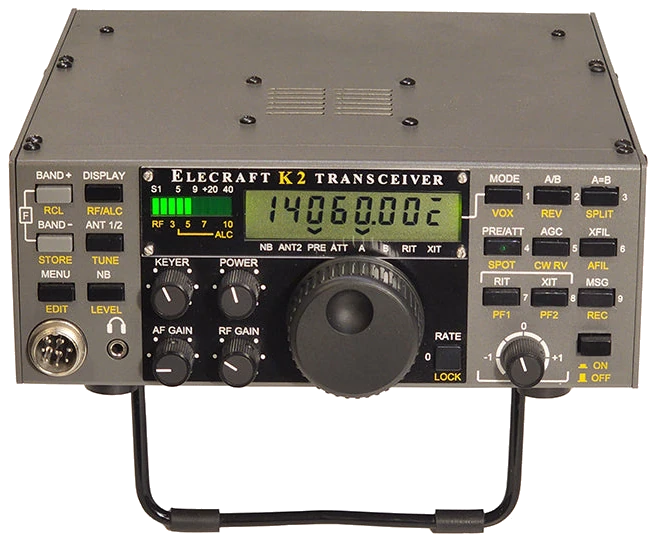
English Owner’s Manual Rev I (29 March 2012), for serial numbers 4060 and above with Revision B PCB; errata I-8 (13 June 2018). Checked 2026-09-25. Applies after kit assembly and alignment, using original firmware; older hardware and fitted options need their own documentation. References use printed page numbers. The errata covers construction changes, not a new CW operating menu.
Use this order as an operating checklist, not as a replacement for the radio manual. Controls and available options can vary by firmware and region.
Use a stereo KEY plug and set INP correctly.
Hold VOX until TEST appears and C flashes.
Set KEYER speed, ST L and ST P.
Use SPOT and then XFIL to isolate the desired note.
Return to OPER only after checking frequency, antenna and output power.
Tap MENU and turn VFO to select an entry, hold EDIT to change its value, then tap MENU to leave editing and again to exit. Search settings or paths below. Manufacturer recommendations and CW599 advice are labeled; examples are not defaults.
MENU > INPCW599 note: A hand key or external keyer uses HAND and the tip contact. Use a stereo plug even for a hand key; the ring is a paddle contact and must not be accidentally grounded. For paddles, PDLn uses tip for dots and ring for dashes; PDLr reverses them.
Hold VOX > TESTCW599 note: Confirm TEST and the flashing C mode letter before adjusting a key. Hold VOX again only when ready to return to normal operation.
KEYERCW599 note: Turn KEYER and send a short word in TEST. Read the WPM display and keep clear spaces before deciding to increase speed.
MENU > IABCW599 note: Use the iambic mode familiar from your other keyer. Test a squeeze-and-release sequence; extra final elements usually indicate a mode or release-timing mismatch.
MENU > ST L / ST PCW599 note: Adjust in TEST; AF GAIN does not set sidetone volume. Changing ST P also changes the CW receive offset; check the received note after leaving the menu. The crystal-filter BFO positions are not automatically optimized: if the signal weakens after a pitch change, follow the CAL FIL alignment procedure rather than guessing values.
Manual reference: K2 Owner’s Manual Rev I, pp. 47, 77, 89, 100–101
XFIL; AFILCW599 note: Begin with a wider XFIL choice and narrow after tuning. AFIL requires its option; do not assume an uninstalled module is a hidden software setting. Hold XFIL + AGC together to inspect the filter number and bandwidth; alignment/customization changes the actual presets.
Hold SPOT; hold CW RVCW599 note: Hold SPOT and tune the VFO until the received note matches the reference; tap a switch to end it. Then hold CW RV to try the opposite sideband against interference; a bar above C indicates reverse. Compare the wanted signal and interferer. A large pitch jump calls for another SPOT check. SPOT does not display received text.
MENU > T-RCW599 note: Try a short delay for relaxed operating, then compare faster recovery while listening with your normal headphones. A zero setting is the fastest, not an accuracy setting for Morse timing.
Hold REC > 0–8; MSG ends recording; MSG > 0–8 playsCW599 note: Recording requires a paddle plugged directly into the K2 and INP set to PDLn/PDLr. Hold REC, tap a buffer number, send the message, then tap MSG to finish. Tapping MSG before sending preserves the old contents. Tap MSG then tap the number for one playback; MSG or a paddle tap cancels it. Verify callsign and spacing before returning to OPER.
MENU > RPT; tap MSG, then hold 0–8CW599 note: RPT sets the pause between messages. The buffer number flashes at the end of each repeated transmission; MSG or the key/paddle stops it. A tap selects one playback; a hold selects repeat. FPLY is a separate shortcut: enabling it takes over the selected buttons’ tap functions in CW mode.
No matching settings. Try a shorter search or clear the search and category.
These are original operator-oriented starting points. They are not factory presets and intentionally avoid claiming model-specific default values.
Check one change at a time.
Keep the wanted signal audible.
Leave a clear path back to receiving.
The checked documentation does not provide a built-in received-CW text workflow for K2. SPOT is a pitch-matching aid, not a text decoder.
The audio filter requires its optional module. Check fitted hardware before troubleshooting a menu.
Check the required stereo plug and INP HAND configuration; an unintended ring-to-ground connection can trigger the paddle input.
Use the manufacturer-controlled product and support pages to verify your region, firmware, menus, connector wiring, operating limits, and safety information. CW599 does not host, mirror, or reproduce the manual.
Search and filters run locally in your browser and do not connect to a radio. Version 1.0 (2026-09-25): bilingual guide and sourced product photo. Revisions are retained in site Git and release backups; no separate archived page.