
Connect the key
Use PADDLE for the internal keyer, KEY for direct keying.
This guide covers the currently orderable K4 and K4D. The product page still lists K4HD as a preorder with price to be determined; it is not treated here as a shipping model. Receiver hardware and fitted options differ; the workflow concentrates on choosing the correct receiver, proving TX Test and using two text windows without confusing the transmit frequency.
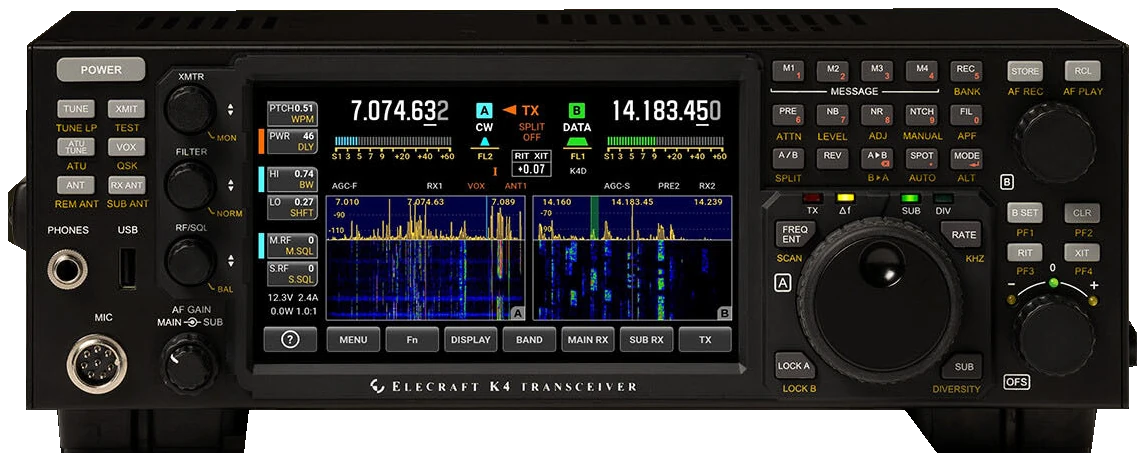
English Built-In Operating Manual D14 (cover: 2 May 2026; download list: 5 May 2026), and production software R38 notes (17 June 2026). Local operation; remote-client behavior needs its separate setup checks. Fitted options apply. Checked 2026-09-23; original firmware; printed manual pages unless marked PDF.
Use this order as an operating checklist, not as a replacement for the radio manual. Controls and available options can vary by firmware and region.
Use PADDLE for the internal keyer, KEY for direct keying.
Hold TEST and verify the TX Test icon.
Adjust WPM, PTCH and MON with a short practice phrase.
Use SPOT and enable TEXT DECODE on the intended receiver.
Check TX VFO and power, leave test mode, enable VOX and send once.
K4 provides independent receive text for MAIN RX and SUB RX. Its TX line echoes paddle or keyboard characters; it is separate from received callsigns.
Tune the intended main or sub receiver to CW.
Open MAIN RX or SUB RX > TEXT DECODE and select one or three receive lines.
Use AUTO threshold first. Try a fixed threshold only if noise keeps producing characters.
Center one signal with SPOT/AUTO and read its matching receiver window while listening.
Return to the receive-decode setting above, confirm a steady audible CW signal and retune before changing more parameters. Transmit echo alone does not confirm receive decoding.
Listen to one complete call and compare it with the display. Fading and irregular spacing can defeat the decoder; request a repeat and copy by ear instead of completing an uncertain callsign from guesses.
Center the wanted signal first, then narrow the receive filter gradually. If the wanted tone disappears, widen the filter and tune again. Stop adjusting when a clear tone and stable text agree.
Source reference: K4 Built-In Operating Manual rev. D14, pp. 48–51 (PDF)
Search by setting or menu path. Manufacturer defaults and recommendations are labeled separately from CW599 advice; references identify the checked manual or software version.
Rear KEY / PADDLE; TX > PDL / IAMB / WEIGHTCW599 note: Plug a paddle into PADDLE and a straight key or external keyer into KEY. Test dot and dash separately in TX Test; the text-echo workflow depends on using the internal keyer or keyboard.
Manual reference: K4 Built-In Operating Manual rev. D14, pp. 14, 42–43, 48 (PDF)
{XMTR} > WPMCW599 note: Adjust WPM while sending a familiar short phrase in TX Test. Keep complete character and word spaces; increasing speed should follow accurate spacing rather than replace it.
Manual reference: K4 Built-In Operating Manual rev. D14, p. 48 (PDF)
{XMTR} > PTCH; hold {XMTR} > MONCW599 note: Select a note comfortable for long listening. The manual recommends multiples of 50 Hz when IIR filters are used; confirm the signal remains centered as the passband narrows.
Manual reference: K4 Built-In Operating Manual rev. D14, p. 49 (PDF)
Hold TESTCW599 note: Use the explicit test mode before adjusting the paddle or playing a stored message. Check the icon and absence of RF output; KEY OUT can still switch attached equipment in TX Test. R38 preserves TEST and SPLIT across power cycles, so verify the icon and TX arrow every time.
Manual reference: K4 Built-In Operating Manual rev. D14, pp. 20, 49; R38 release notes (PDF)
VOX; hold QSK; {XMTR} > DLYCW599 note: Enable VOX for key-triggered transmission after leaving TX Test. Try QSK off first and set a comfortable DLY; activate QSK only after checking the amplifier and station switching path.
Manual reference: K4 Built-In Operating Manual rev. D14, pp. 21–22, 49, 108 (PDF)
SPOT / AUTOCW599 note: Tune close by ear, then use SPOT or AUTO with the wanted signal inside the passband. Watch the VFO after automatic tuning; a stronger neighbor can be a poor target.
Manual reference: K4 Built-In Operating Manual rev. D14, pp. 49–50 (PDF)
MAIN RX / SUB RX > TEXT DECODECW599 note: Enable text for the receiver carrying the wanted station. The two receivers can decode independently; read the correct window and compare the complete call with its audio before logging.
Manual reference: K4 Built-In Operating Manual rev. D14, p. 51 (PDF)
REC > M1–M4; hold BANK; TX TestCW599 note: Tap REC, choose M1–M4 and enter text with the displayed keyboard; hold BANK to choose bank I or II. Rehearse in TX Test. Tap REC or the paddle to cancel local playback; a second message button chains another message instead of stopping. Set MENU > Message Repeat Interval before using hold-to-repeat; verify the flashing MSG RPT indication stops. Remote-client interruption differs: verify it separately.
Manual reference: K4 Built-In Operating Manual rev. D14, p. 50 (PDF)
No matching settings. Try a shorter search or clear the search and category.
These are original operator-oriented starting points. They are not factory presets and intentionally avoid claiming model-specific default values.
Check one change at a time.
Keep the wanted signal audible.
Leave a clear path back to receiving.
The shared operating manual covers this interface; receiver hardware and options differ. Check the exact ordered configuration.
TX Test deliberately blocks RF. VOX off also requires a separate transmit action. Check the state before changing cables.
Check whether you enabled MAIN RX or SUB RX text and which receiver is tuned to the wanted signal.
Use the manufacturer-controlled product and support pages to verify your region, firmware, menus, connector wiring, operating limits, and safety information. CW599 does not host, mirror, or reproduce the manual.
Search and filters run locally in your browser and do not connect to a radio. Version 1.0 (2026-09-23): bilingual guide and sourced product photo. Revisions are retained in site Git and release backups; no separate archived page.