
Connect the correct key
Check KEY1 for the external jack or KEY2 for the attached paddle.
KX2 puts field CW controls close at hand. Start with sidetone practice without RF, then use its tuning aid and receive decoder to support a contact you can follow by ear. Optional tuners and attached paddles depend on the ordered configuration.
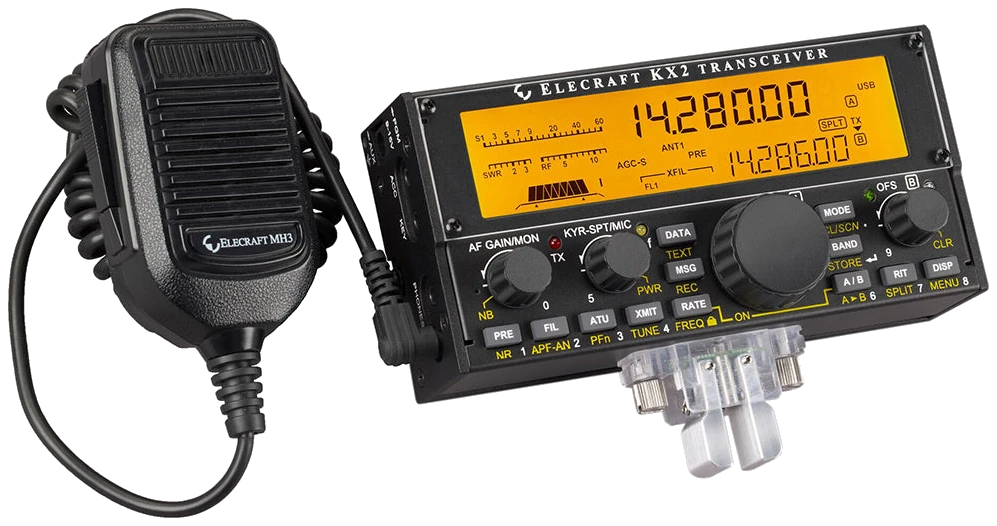
English owner’s manual B2, 22 March 2023; Elecraft currently lists production MCU 3.02 / DSP 1.52. Check MENU > FW REVS on your radio. Regional band permissions and installed options remain model-specific; the photographed paddle and microphone are optional accessories. Checked 2026-09-21; original firmware; printed manual pages unless marked PDF.
Use this order as an operating checklist, not as a replacement for the radio manual. Controls and available options can vary by firmware and region.
Check KEY1 for the external jack or KEY2 for the attached paddle.
Select PTT-CW / VOX off; do not press XMIT.
Send a short callsign and adjust KYR-SPT/MIC, pitch and MON.
Tune with CWT/SPOT, then narrow the filter and optionally enable receive text.
Enable VOX, check transmit frequency and power, then send once and listen.
Built-in received-CW decoding is separate from your transmitted text. Use it to confirm a call you can hear, not to fill in a call lost in fading.
Hold TEXT and choose RX THRn with OFS/B; TX ONLY will not decode another station.
Enable CWT, match the note and reduce the bandwidth to 0.30 kHz or less if the signal remains readable.
Adjust RX THRn until the CWT segment flashes with the received keying. Strong or fast signals may need a higher threshold.
Read VFO B and compare a complete callsign by ear. Use DISP if a special VFO B display is in the way.
Return to the receive-decode setting above, confirm a steady audible CW signal and retune before changing more parameters. Transmit echo alone does not confirm receive decoding.
Listen to one complete call and compare it with the display. Fading and irregular spacing can defeat the decoder; request a repeat and copy by ear instead of completing an uncertain callsign from guesses.
Center the wanted signal first, then narrow the receive filter gradually. If the wanted tone disappears, widen the filter and tune again. Stop adjusting when a clear tone and stable text agree.
Hold MENU, select an entry with OFS/B, change its value with VFO A, and tap DISP to exit (p. 14). Search by setting or menu path. Manufacturer defaults and recommendations are labeled separately from CW599 advice; references identify the checked manual or software version.
MENU > CW KEY1 / CW KEY2CW599 note: Use KEY1 for the external jack and KEY2 for the attached paddle. Test separate dot and dash presses before a contact; a reversed paddle is a configuration issue, not a reason to relearn your hand movement.
KYR-SPT/MIC control in CWCW599 note: Turn the keyer control while listening to your own rhythm. Send your callsign twice without RF; choose a speed at which character spacing remains deliberate, then listen for a caller at that speed.
MENU > PITCH; tap AF/MON > MONCW599 note: Choose a comfortable note, then use MON to set its loudness. Tune the received note to the same pitch before narrowing the filter; changing volume alone does not correct an off-frequency signal.
MENU > VOX MD; MENU > VOX DLYCW599 note: Select PTT-CW (KX2: VOX MD OFF) and leave XMIT untouched to hear sidetone without RF. Enable VOX only after this check. Increase recovery delay if listening between elements is tiring.
FIL > AF/MON width; hold APF-AN; MENU > CWTCW599 note: Tap FIL, turn AF/MON for width and KYR-SPT/MIC for shift; tap KYR-SPT/MIC to center the passband. Exit FIL ADJ before tapping KYR-SPT/MIC for spot (CWT off) or auto-spot (CWT on). Narrow in small steps and compare APF on/off at the same listening level. Keep the version that preserves complete dots and dashes.
Hold TEXT > OFS/B > RX THRnCW599 note: TX ONLY shows your internal-keyer output. Select an RX threshold for incoming text on VFO B; adjust it until the CWT segment follows the incoming keying. DISP restores VFO B if another special display hides the text.
Hold REC > 1–3; MSG to finish; MSG > 1–3 to playCW599 note: Record with the internal keyer paddle; an external keyer cannot record these text buffers. Play once with RF disabled and cancel with XMIT or the key. Replace example callsigns before transmitting.
MENU > MSG RPT; MSG then hold a message keyCW599 note: Holding the message key starts repeating playback. Use a single playback until its content and stop action are familiar; when repeating CQ, keep an audible receive gap long enough to notice an answer.
No matching settings. Try a shorter search or clear the search and category.
These are original operator-oriented starting points. They are not factory presets and intentionally avoid claiming model-specific default values.
Check one change at a time.
Keep the wanted signal audible.
Leave a clear path back to receiving.
TX ONLY is selected. Choose RX THRn and tune a received CW signal.
PTT-CW / VOX off is the intentional practice state. Confirm the antenna and transmit frequency before enabling VOX.
No. This guide uses 3 text buffers for KX2. Attached paddles and optional modules also differ between models.
Use the manufacturer-controlled product and support pages to verify your region, firmware, menus, connector wiring, operating limits, and safety information. CW599 does not host, mirror, or reproduce the manual.
Search and filters run locally in your browser and do not connect to a radio. Version 1.0 (2026-09-21): bilingual guide and sourced product photo. Revisions are retained in site Git and release backups; no separate archived page.