
Prepare the field key
Connect the intended straight key or paddle before leaving home and set Key Type to match it.
An original CW599 workflow for getting this radio ready to listen and send. It does not reproduce the manufacturer manual; confirm exact labels, options, and firmware behavior with the official resource before transmitting.
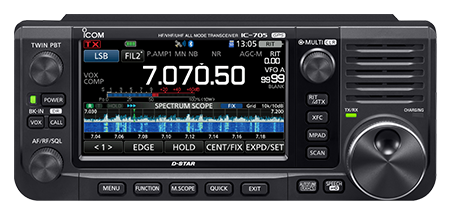
Use this order as an operating checklist, not as a replacement for the radio manual. Controls and available options can vary by firmware and region.
Connect the intended straight key or paddle before leaving home and set Key Type to match it.
Select CW or CW-R, confirm CW Normal Side, and set a comfortable CW pitch.
Use the key-speed control and CW-KEY SET sidetone level before operating with headphones.
Start with semi break-in and verify your portable power, antenna, and keyer arrangement are stable.
Keep USB SEND/Keying disabled until a tested interface is connected.
Search the model-specific CW controls below. Menu labels and ranges are drawn from official documentation; the notes are original CW599 operating guidance.
KEYER > EDIT/SET > CW-KEY SET > Key TypeCW599 note: Match the selected type to the actual field key.
[CW PITCH] controlCW599 note: A moderate pitch is usually easier to hear outdoors or through headphones.
[KEY SPEED] controlCW599 note: Set a speed that remains comfortable when battery or field conditions demand attention.
[VOX/BK-IN]CW599 note: Use semi break-in first; full break-in requires a reliable station setup.
SET > Function > CW Normal SideCW599 note: Use one sideband convention consistently so tuning remains intuitive.
KEYER > EDIT/SET > CW-KEY SET > Side Tone LevelCW599 note: Keep monitor level below fatigue level, especially with closed headphones.
KEYER > EDIT/SET > CW-KEY SET > Paddle PolarityCW599 note: Verify with a short local sending check before transmitting.
KEYER > EDIT/SET > CW-KEY SET > Dot/Dash RatioCW599 note: Neutral weighting is a dependable portable starting point.
KEYER > EDIT/SET > CW MEMORYCW599 note: Keep field messages concise and always listen before playing one.
SET > Connectors > USB SEND/KeyingCW599 note: Enable only for a configured USB interface; do not assume generic serial wiring.
No matching settings. Try a shorter search or clear the search and category.
These are original operator-oriented starting points. They are not factory presets and intentionally avoid claiming model-specific default values.
A calm setup for learning the radio.
A patient workflow for signals close to noise.
For operators who need quicker station turnaround.
Use the manufacturer-controlled product and support pages to verify your region, firmware, menus, connector wiring, operating limits, and safety information. CW599 does not host, mirror, or reproduce the manual.