
Connect and select
Connect the correct key socket and select CW.
The separated controller and main unit have different key sockets. This guide keeps their roles distinct and covers the memory keyer, side tone and break-in before moving from HF to higher bands.
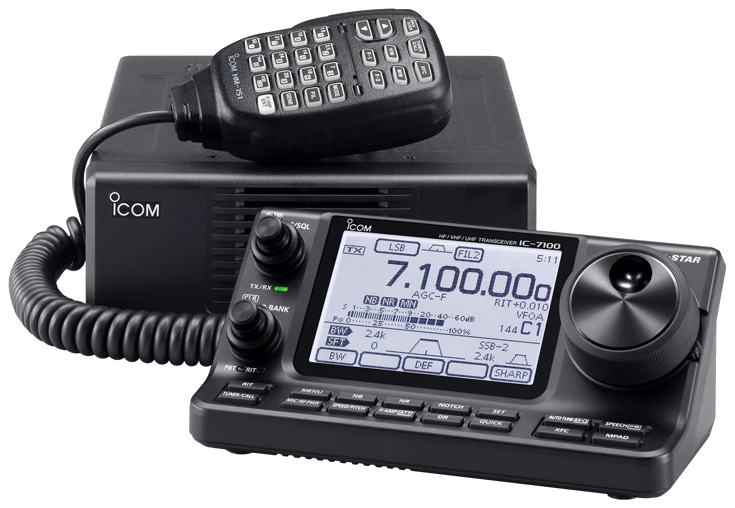
English Full Manual ENG FM 5. Global/European documentation; region and installed options may change band coverage. Checked 2026-09-13; original firmware; printed manual pages unless marked PDF.
Use this order as an operating checklist, not as a replacement for the radio manual. Controls and available options can vary by firmware and region.
Connect the correct key socket and select CW.
Keep break-in OFF and confirm side tone without RF.
Set key speed, pitch, side-tone level and polarity.
Tune the wanted signal by ear before reducing receive bandwidth.
Check transmit frequency and power; enable BKIN and send one short call.
Search by setting or menu path. Manufacturer defaults and recommendations are labeled separately from CW599 advice; references identify the checked manual or software version.
MENU > M-2 > KEYER > MENU > SET > Keyer TypeCW599 note: Set the controller ELEC-KEY jack for your paddle. The separate main-unit KEY jack remains direct keying regardless of this setting. Test individual contacts with break-in off before transmitting.
SPEED/PITCH > M-CH / BANKCW599 note: Select CW before opening the speed control. Send a short callsign with break-in off; use a speed with clean gaps and verify it again after using an external keyer, whose speed is set separately.
SPEED/PITCH > M-CH / BANKCW599 note: Choose a comfortable sidetone, then tune the received note to match it. Pitch changes the listening reference; it does not retune a split transmit VFO to the other station automatically.
MENU > M-2 > KEYER > MENU > SET > Side Tone LevelCW599 note: Keep break-in off and listen while keying. Adjust this level rather than increasing overall receiver gain; verify that the note stays comfortable when headphones replace the speaker.
MENU > M-2 > KEYER > MENU > SET > Paddle PolarityCW599 note: Use this when dot and dash are opposite to your usual hand motion. Test each side separately and a short alternating sequence; do not change keyer type just to swap contacts.
MENU > M-3 > BK-INCW599 note: OFF with the radio in receive permits side-tone practice. Start on air with BKIN and a comfortable receive delay; use F-BKIN only after confirming the complete station can switch between elements.
MENU > M-2 > KEYER > MENU > SET > Dot/Dash RatioCW599 note: Keep the documented ratio initially. If a correspondent reports unusual spacing, first check speed and your release timing; changing dash ratio does not repair missing character gaps.
MENU > M-2 > KEYER > MENU > SET > Rise TimeCW599 note: Retain the documented starting value while setting up the station. Judge changes with a separate receiver or a reliable on-air report; a sharper local sidetone does not establish cleaner transmitted keying.
M-2 > KEYER > EDIT / SENDCW599 note: Enter your own callsign and a short exchange. Play once with break-in off to check every character; only then enable transmit, and test stopping playback before using repetition.
MENU > M-2 > KEYER > MENU > SET > Keyer Repeat TimeCW599 note: The repeat timer controls the gap, not a promise that the channel is free. Use one-shot CQ first, then choose a gap that gives you enough time to hear a weak reply.
No matching settings. Try a shorter search or clear the search and category.
These are original operator-oriented starting points. They are not factory presets and intentionally avoid claiming model-specific default values.
Check one change at a time.
Keep the wanted signal audible.
Leave a clear path back to receiving.
The checked documentation does not provide a built-in received-CW text workflow for IC-7100. CW auto tuning and RTTY text decoding do not imply received-CW text decoding.
Break-in OFF in receive is the expected practice state. Confirm the station connections before selecting BKIN.
Check split, RIT/XIT and the active transmit VFO or band. Restore a deliberate simplex setup before an ordinary contact.
Use the manufacturer-controlled product and support pages to verify your region, firmware, menus, connector wiring, operating limits, and safety information. CW599 does not host, mirror, or reproduce the manual.
Search and filters run locally in your browser and do not connect to a radio. Version 1.0 (2026-09-13): bilingual guide and sourced product photo. Revisions are retained in site Git and release backups; no separate archived page.