
Connect and select
With power off, hold SET while switching on. Select Key Type with UP/DN and set it with MAIN DIAL; restart normally afterwards.
Icom UK lists the IC-718 and its return to sale in 2025. Regional status differs: Icom Europe shows out of stock and the global page carries a discontinued notice. This guide uses the Basic Manual linked by Icom UK; match filter hardware and USA-listed defaults to your delivered unit.
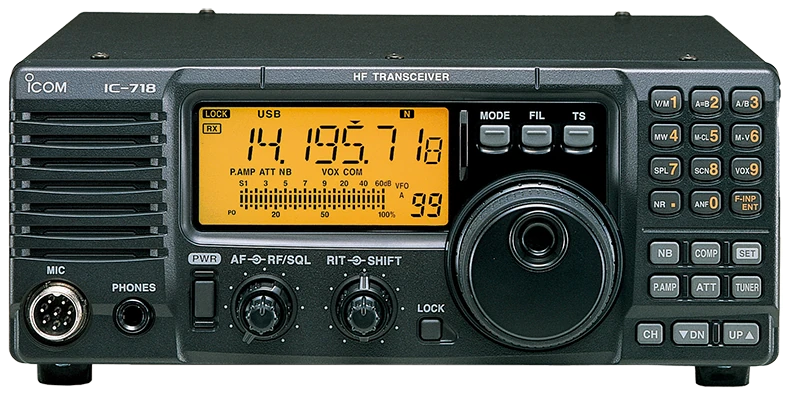
English Basic Manual A7768D-1EX, November 2023, linked by Icom UK; USA defaults; revived production and regional hardware checked separately. Checked 2026-09-17; original firmware; printed manual pages unless marked PDF.
Use this order as an operating checklist, not as a replacement for the radio manual. Controls and available options can vary by firmware and region.
With power off, hold SET while switching on. Select Key Type with UP/DN and set it with MAIN DIAL; restart normally afterwards.
In CW, hold SET for one second to enter Quick Set; use UP/DN and MAIN DIAL to set BK-IN oF, then press SET to exit.
Set Key Speed, CW Pitch and Side Tone Level.
Tune a wanted tone before narrowing FIL or shifting IF.
Check power and frequency, choose SE or FL, send once and listen.
Search by setting or menu path. Manufacturer defaults and recommendations are labeled separately from CW599 advice; references identify the checked manual or software version.
Initial Set > Key TypeCW599 note: Use n or r for paddle polarity, oF for a straight key or external keyer, and ud only for microphone UP/DN keying. Verify separate dot/dash presses before a contact.
Manual reference: Current IC-718 Basic Manual, pp. 12–14, 18–20; defaults are USA-version values
Quick Set > BK-IN > oF; SQLS LowCW599 note: Set BK-IN off and follow the manual’s SQLS Low condition for sidetone. Confirm there is no RF while adjusting the key. Re-enable break-in only after checking the antenna and transmit frequency.
Manual reference: Current IC-718 Basic Manual, pp. 12–14, 18–20; defaults are USA-version values
Quick Set > Key SpeedCW599 note: Some intermediate values are unavailable. Choose a speed you can copy and test character spacing with a short callsign; this controls the internal keyer, not an external keyer’s timing.
Manual reference: Current IC-718 Basic Manual, pp. 12–14, 18–20; defaults are USA-version values
Quick Set > CW PitchCW599 note: A display of 60 means 600 Hz. Choose a comfortable note and tune the received signal to it before narrowing the filter; changing pitch is different from adjusting sidetone volume.
Manual reference: Current IC-718 Basic Manual, pp. 12–14, 18–20; defaults are USA-version values
Initial Set > Side Tone LevelCW599 note: Use BK-IN off for the setup and raise level only until the note is clear. Recheck it at the headphone volume you will actually use, so practice does not become unnecessarily loud.
Manual reference: Current IC-718 Basic Manual, pp. 12–14, 18–20; defaults are USA-version values
Quick Set > Key RatioCW599 note: 30 represents a 3.0 dash-to-dot ratio. Preserve it while learning the keyer; a stretched dash does not repair missing letter spacing. Compare your recorded rhythm after any change.
Manual reference: Current IC-718 Basic Manual, pp. 12–14, 18–20; defaults are USA-version values
Quick Set > BK-IN / BK-IN DelayCW599 note: Start with SE for a relaxed receive gap. Delay is expressed in dot lengths, so its time changes with keyer speed. Compare FL only after the complete station can switch comfortably between elements.
Manual reference: Current IC-718 Basic Manual, pp. 12–14, 18–20; defaults are USA-version values
FIL; SHIFTCW599 note: First confirm the fitted filter and Initial Set FIL selection match; narrow filtering is not selected by default. Tune the wanted tone, use FIL and confirm N on screen, then compare SHIFT gently. If N does not narrow reception, consult pp. 13–14 for the hardware and setting combination; do not copy an older crystal-filter installation procedure.
Manual reference: Current IC-718 Basic Manual, pp. 12–14, 18–20; defaults are USA-version values
No matching settings. Try a shorter search or clear the search and category.
These are original operator-oriented starting points. They are not factory presets and intentionally avoid claiming model-specific default values.
Check one change at a time.
Keep the wanted signal audible.
Leave a clear path back to receiving.
The checked documentation does not provide a built-in received-CW text workflow for IC-718. The internal electronic keyer is a sending function, not a received-text decoder.
No. The manual explicitly labels its listed defaults as USA-version values. Check the delivered regional unit.
First identify the hardware revision. The revised manual contains digital-filter and hardware-dependent selections; older installation instructions are not automatically applicable.
Use the manufacturer-controlled product and support pages to verify your region, firmware, menus, connector wiring, operating limits, and safety information. CW599 does not host, mirror, or reproduce the manual.
Search and filters run locally in your browser and do not connect to a radio. Version 1.0 (2026-09-17): bilingual guide and sourced product photo. Revisions are retained in site Git and release backups; no separate archived page.