
Prepare the key
Select CW and leave break-in OFF and TRANSMIT disengaged. Set Key Type to match the hardware; an external electronic keyer needs Straight.
Get from a newly connected key to a deliberate first contact. This guide explains the MK2 controls, how to listen before transmitting, and how to use its decoder without letting an uncertain decode become a logged callsign. It is a separate guide from the original IC-7300.
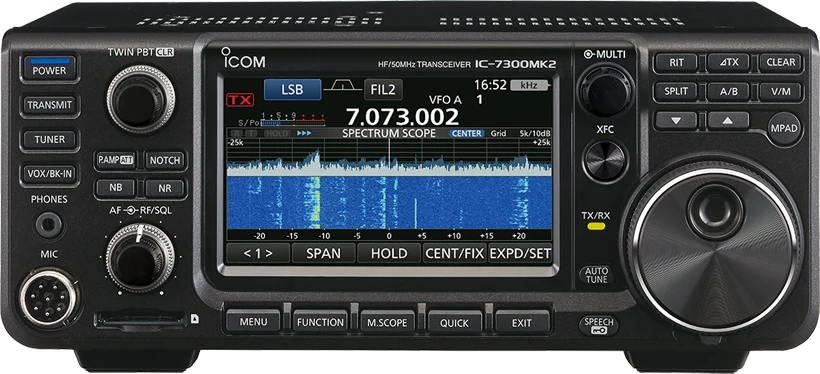
Checked 2026-09-06: English Basic 2ato2b (84 PDF pages), Advanced 0 (90 PDF pages). References below use printed page numbers. Listed factory defaults follow the USA scope stated in the Basic manual; regional settings and later firmware may differ. Guide v1.1; this is document verification, not a hardware test.
Use this order as an operating checklist, not as a replacement for the radio manual. Controls and available options can vary by firmware and region.
Select CW and leave break-in OFF and TRANSMIT disengaged. Set Key Type to match the hardware; an external electronic keyer needs Straight.
Use MULTI for KEY SPEED and CW PITCH. Listen to separate dots and dashes with no RF output before choosing a comfortable sending speed.
Find the station by ear, then adjust the IF filter and APF. If auto tune chooses a neighbour, tune manually and compare the tone again.
Listen for a clear frequency, select BKIN and use appropriate low power. Check that key-up returns to receive before trying memories or full break-in.
Review M1–M8 text and the serial counter. Open CW DECODE only after the signal is tuned; check uncertain letters by ear.
Search the model-specific CW controls below. Menu labels and ranges are drawn from official documentation; the notes are original CW599 operating guidance.
MENU > SET > CW-KEY Set > Key TypeCW599 note: Choose by the device, not your preferred speed. Paddle uses the internal keyer; an external keyer supplies its own timing and uses Straight. With break-in off, confirm a single press produces the expected element.
CW: press MULTI > KEY SPEED; rotate MULTICW599 note: This changes the internal keyer timing, not the other station’s speed. Send a short familiar word in sidetone and lower the setting if elements or spaces become uneven.
CW: MULTI > CW PITCH; SET > CW-KEY Set > Side Tone LevelCW599 note: Pitch changes the heard tone without moving the operating frequency. Adjust the level separately at modest headphone volume; verify both the received note and your own keying remain comfortable.
MENU > SET > CW-KEY Set > Paddle PolarityCW599 note: Use Reverse if the expected dot and dash sides are exchanged. Test each side separately with break-in off before squeezing both paddles.
MENU > SET > CW-KEY Set > Dot/Dash RatioCW599 note: Keep the neutral ratio while learning the key. Lengthening dashes cannot repair rushed character spacing; compare a recording before changing the ratio.
CW: VOX/BK-IN; hold 1 s for delay, rotate MULTICW599 note: OFF permits sidetone practice while the radio is in standby. BKIN holds transmit briefly after key-up; F-BKIN listens between elements. Verify amplifier and relay timing before using full break-in.
MENU > SET > CW-KEY Set > Rise TimeCW599 note: This shapes the RF envelope; it is not the receive-return delay. Keep the default unless an actual signal check shows a need to change it.
CW: hold IF filter indicator 1 s > select FIL 1/2/3 > BW; rotate MAIN DIALCW599 note: Centre the wanted signal before narrowing. IF bandwidth separates nearby signals before audio processing; APF is a separate control. If copy becomes worse, widen BW and retune. Changing BW resets Twin PBT to centre.
CW: FUNCTION > 2 > APF; hold APF 1 sCW599 note: Tune first, then narrow only until the wanted note separates from interference. Compare APF on and off at similar loudness; a louder tone alone is not better copy.
MENU > KEYER/DECODE > CW DECODE > function menu 2 > ADJCW599 note: THRESH separates keying from noise; FILTER selects what the decoder follows; SPEED controls timing recognition. The reviewed manual calls its manual speed option MANUAL, while current product copy uses KEYSPEED linked. Follow the labels on your firmware and verify uncertain characters by ear.
MENU > KEYER/DECODE > KEYER > EDIT/SET > EDITCW599 note: Write a short CQ with your own callsign, then audition in standby with break-in off. A one-second hold on a memory key starts repeat; touch it again to stop. Listen between calls.
MENU > KEYER/DECODE > KEYER > EDIT/SET > 001 SETCW599 note: Check which memory advances the counter and replace inherited contest text. Compare the displayed number to your log before an exchange; the minus-one control corrects an accidental increment.
MENU > SET > Connectors > USB SEND/Keying > USB Keying (CW)CW599 note: Configure CI-V control and CW keying separately. A terminal already used for SEND or RTTY cannot also be assigned here. Test with RF transmission inhibited before opening your contest software on an antenna.
No matching settings. Try a shorter search or clear the search and category.
These are original operator-oriented starting points. They are not factory presets and intentionally avoid claiming model-specific default values.
A calm setup for learning the radio.
A patient workflow for signals close to noise.
For operators who need quicker station turnaround.
Select CW first. This control is mode dependent. Its short-press behaviour can also be changed in MENU SET; a different initial screen does not mean the keyer has disappeared.
Its automatic filter can follow the strongest signal. Tune the wanted signal to the centre and try FIX; then compare THRESH and SPEED settings. Noise, fading and irregular timing still cause errors.
The official product documentation says CW decode output over USB is not supported. USB audio and computer keying are separate functions. Confirm the callsign yourself before entering a log.
Use the manufacturer-controlled product and support pages to verify your region, firmware, menus, connector wiring, operating limits, and safety information. CW599 does not host, mirror, or reproduce the manual.
Setting search and filters run in your browser and do not connect to or control your radio. Version 1.1 (2026-09-07) adds official transparent product images and language-specific resource labels; 1.0 introduced the bilingual guide. revisions are retained in site Git and deployment backups, with no separate archived guide page yet.