
Enter CW and confirm the active side
Select CW first. The [KEYER] menu appears only in CW mode; before touching any keying control, check whether Main or Sub is the receiver and transmit side you intend to use.
An original CW599 workflow for getting this radio ready to listen and send. It does not reproduce the manufacturer manual; confirm exact labels, options, and firmware behavior with the official resource before transmitting.
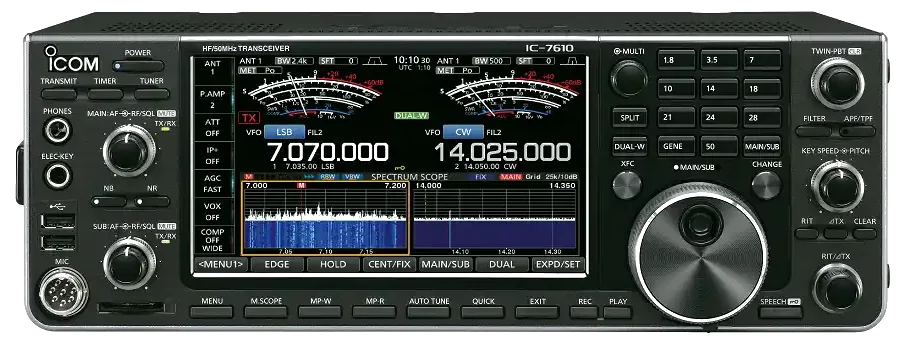
Use this order as an operating checklist, not as a replacement for the radio manual. Controls and available options can vary by firmware and region.
Select CW first. The [KEYER] menu appears only in CW mode; before touching any keying control, check whether Main or Sub is the receiver and transmit side you intend to use.
Open MENU > KEYER > EDIT/SET > CW-KEY SET > Key Type and select Straight, Bug, or Paddle to match the device on the [KEY] jack.
In CW mode, rotate the inner KEY SPEED/PITCH control for 6-48 WPM. Hold [FILTER] for one second, then use the outer KEY SPEED/PITCH control to set the 300-900 Hz CW pitch.
Touch [BK-IN] to cycle OFF, BKIN (semi break-in), and F-BKIN (full break-in). Hold [BK-IN] for one second to open the semi-break-in delay adjustment.
Use APF only after tuning the wanted station. Edit M1-M8 or the contest serial counter only after manual keying, side tone, and return-to-receive have been checked.
Search the model-specific CW controls below. Menu labels and ranges are drawn from official documentation; the notes are original CW599 operating guidance.
MENU > KEYER > EDIT/SET > CW-KEY SET > Key TypeCW599 note: Match this setting to the physical key at the [KEY] jack before transmitting.
CW mode: rotate the inner KEY SPEED/PITCH controlCW599 note: The speed display appears below the time display while adjusting. Increase only after each element is easy to hear.
CW mode: hold [FILTER] for 1 second, then rotate the outer KEY SPEED/PITCH controlCW599 note: The FILTER screen shows the pitch graphically. Use [EXIT] when finished and confirm you did not change operating frequency.
CW mode: touch [BK-IN]CW599 note: BKIN is semi break-in and F-BKIN is full break-in. Start with BKIN after confirming the station changes cleanly between transmit and receive.
CW mode: hold [BK-IN] for 1 secondCW599 note: A longer delay is easier while checking a new key, amplifier, or relay. Shorten it only after the whole station is proven.
CW mode: press [APF/TPF], then hold it for 1 secondCW599 note: APF is a receive-selectivity tool. Tune the desired station first, then use it only as much as needed to separate nearby CW.
CW mode: MENU > KEYER > EDIT/SET > EDITCW599 note: Edit and audition memory text with break-in off first. When break-in is on, a memory may transmit on air.
CW mode: MENU > KEYER > EDIT/SET > 001 SETCW599 note: Confirm which memory triggers the counter and check the displayed number before a contest exchange.
No matching settings. Try a shorter search or clear the search and category.
These are original operator-oriented starting points. They are not factory presets and intentionally avoid claiming model-specific default values.
A calm setup for learning the radio.
A patient workflow for signals close to noise.
For operators who need quicker station turnaround.
Use the manufacturer-controlled product and support pages to verify your region, firmware, menus, connector wiring, operating limits, and safety information. CW599 does not host, mirror, or reproduce the manual.