
Start with the key and CW mode
Confirm the straight key or paddle follows the official rear-panel guidance, then press [CW/FSK (REV)] until the display shows CW. Leave memories and break-in off for the first check.
An original CW599 workflow for getting this radio ready to listen and send. It does not reproduce the manufacturer manual; confirm exact labels, options, and firmware behavior with the official resource before transmitting.
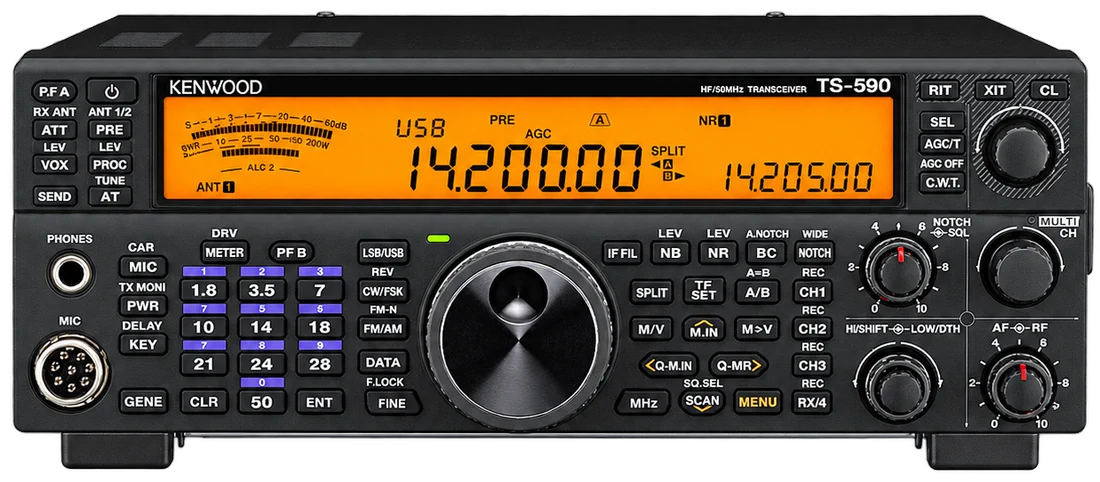
Use this order as an operating checklist, not as a replacement for the radio manual. Controls and available options can vary by firmware and region.
Confirm the straight key or paddle follows the official rear-panel guidance, then press [CW/FSK (REV)] until the display shows CW. Leave memories and break-in off for the first check.
In CW mode press [KEY (DELAY)]. Send with the paddle while listening to sidetone, then turn MULTI/CH to select a deliberate speed before trying to work faster.
Press [VOX (LEV)], then hold [KEY (DELAY)]. Select a semi-break-in delay while checking a new key, amplifier, relay, or interface; choose FBK only after the whole station returns cleanly to receive.
Use Menu 38 for Iambic A or B. Keep Menu 42 on automatic weighting until you have a repeatable reason to set a fixed ratio; Menu 41 is waveform shaping, not a speed control.
Record and audition a short memory only after manual sending works. Before enabling Menu 47, confirm break-in, current frequency, and CW mode changes are all intentional.
Search the model-specific CW controls below. Menu labels and ranges are drawn from official documentation; the notes are original CW599 operating guidance.
[CW/FSK (REV)]; hold to change CW to CW-RCW599 note: Use one receive-side convention consistently while learning to tune.
CW mode: [KEY (DELAY)] then MULTI/CH while monitoring sidetoneCW599 note: Choose a speed you can send and copy cleanly; speed is not a performance setting.
CW mode: [VOX (LEV)] then hold [KEY (DELAY)]CW599 note: Begin with semi break-in on a new station. Treat FBK as a full-station test.
MENU > 38CW599 note: Choose the paddle timing mode that matches your established sending habit.
MENU > 41CW599 note: Leave the documented value in place until you have a measured reason to change signal shaping.
MENU > 42CW599 note: Automatic weighting is a calm starting point; adjust only for a repeatable timing issue.
MENU > 43CW599 note: This changes the automatic-weighting response as speed increases; keep it off until the effect is understood.
MENU > 44CW599 note: Do not enable it by accident: CW message memory is unavailable while Bug is on.
CW mode: hold CH1 / CH2 / CH3 / RX-4 (REC) to recordCW599 note: Stored text can transmit. Listen first and confirm the selected channel before playing a memory.
MENU > 47CW599 note: Use only after intentional testing: it requires CW break-in and can change operating mode when the key is used.
No matching settings. Try a shorter search or clear the search and category.
These are original operator-oriented starting points. They are not factory presets and intentionally avoid claiming model-specific default values.
A calm setup for learning the radio.
A patient workflow for signals close to noise.
For operators who need quicker station turnaround.
Use the manufacturer-controlled product and support pages to verify your region, firmware, menus, connector wiring, operating limits, and safety information. CW599 does not host, mirror, or reproduce the manual.