
Connect and select
Select CW and set front/rear key jack behavior.
Use the dedicated keying and pitch controls to establish a repeatable CW setup. The native CW communication screen has its own threshold and decoder filter.
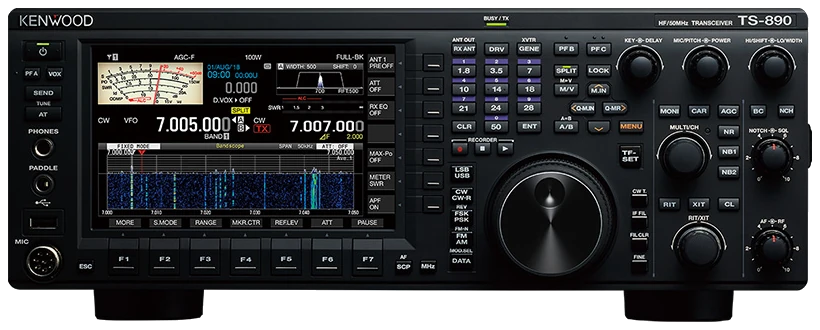
English TS-890S instruction manual B5A-2215-10/01, linked from Kenwood US support; menu group 5, CW operations. Regional options may differ. Checked 2026-09-23; original firmware; printed manual pages unless marked PDF.
Use this order as an operating checklist, not as a replacement for the radio manual. Controls and available options can vary by firmware and region.
Select CW and set front/rear key jack behavior.
Disable break-in and SEND; verify side tone with no RF.
Adjust key speed, pitch and menu 1-02 side-tone volume.
Tune one wanted note and verify the receiver/transmit side.
Enable semi break-in, send one short call and listen before repeating.
TS-890S decodes CW on its communication screen. It has a dedicated decode filter; do not expect APF or noise reduction to clean up the decoder’s input.
Select CW and press F3 DECODE; use ESC if its key label is missing.
Use MORE if needed, then THLD and MULTI/CH. Raise it only enough to reject idle noise.
Cycle Off/Normal/Narrow for the dedicated decoder filter and retune the wanted note.
Read the TX/RX details area, not the outgoing text buffer. Hold CLEAR to clear received/transmitted details; a short press clears the outgoing buffer. DEC.ON resumes decoding; PAUSE separately freezes or resumes display updates.
Check DEC.ON and release PAUSE, then retune a steady audible CW signal. Lower an excessive THLD; hold F2 RESET on the threshold screen to restore 10. Transmit echo alone does not confirm receive decoding.
Listen to one complete call and compare it with the display. Fading and irregular spacing can defeat the decoder; request a repeat and copy by ear instead of completing an uncertain callsign from guesses.
Center the wanted signal first, then narrow the receive filter gradually. If the wanted tone disappears, widen the filter and tune again. Stop adjusting when a clear tone and stable text agree.
Search by setting or menu path. Manufacturer defaults and recommendations are labeled separately from CW599 advice; references identify the checked manual or software version.
MENU > 5-00 / 5-01CW599 note: Set the actual socket used; front and rear defaults differ. Test with break-in disabled. An external electronic keyer normally needs direct Straight Key input, not another automatic keyer stage.
KEY SPEED (KEY control)CW599 note: Turn the dedicated speed control while practicing a short callsign. Read the temporary speed display and keep your outgoing speed close to a caller you can comfortably copy.
MIC/PITCH; MENU > 1-02CW599 note: Choose a comfortable note, then set Sidetone Volume in menu 1-02. AF is not the side-tone/message playback volume control; check again after changing headphones.
VOX; DELAYCW599 note: For TS-890S, turn DELAY fully left to select FULL-BK; a finite delay gives semi break-in. Verify the intended indication and use semi until the station’s amplifier switching is confirmed.
CW; break-in and SEND offCW599 note: Disable all transmit-enabling actions before practicing. Confirm no RF output while testing the key and memories; leave SEND untouched until the station is ready for an on-air check.
MENU > 5-15 > CW Rise TimeCW599 note: Keep the documented value for initial setup. Evaluate any faster edge with the actual station and a reliable transmitted-signal report, rather than judging only the local monitor.
MENU > 5-11 > CW Message Entry; F2 KEYERCW599 note: Choose text or paddle entry, hold the target channel to record/edit, and store your own short call. Check playback with VOX off (LED unlit) before enabling repeat or a contest exchange; F5 STOP cancels playback. Recheck any enabled count-up serial after rehearsal.
MENU > 5-12 / 5-14CW599 note: Set the starting serial in 5-12 and the count-up message channel in 5-14. That channel increments the number after playback as well as transmission. Recheck it after rehearsal or an interrupted exchange; KEYER F6 [-1] can decrement it when count-up is configured.
CW > F3 DECODE > THLD / DEC.FILCW599 note: If the key guide is hidden, ESC leaves the other screen; MORE exposes additional decode controls. Set THLD just above idle noise and use DEC.FIL for interference. APF and NR do not act in the decoder path.
No matching settings. Try a shorter search or clear the search and category.
These are original operator-oriented starting points. They are not factory presets and intentionally avoid claiming model-specific default values.
Check one change at a time.
Keep the wanted signal audible.
Leave a clear path back to receiving.
The manual excludes APF, NR1/NR2 and RX DSP equalizer from CW decoding. Use DEC.FIL and THLD instead.
Use menu 1-02 Sidetone Volume. Side tone and CW message playback are separate from receiver AF level.
No. Break-in controls and menu numbers differ. Use this model’s paths, especially CW Rise Time and CW Message Entry.
Use the manufacturer-controlled product and support pages to verify your region, firmware, menus, connector wiring, operating limits, and safety information. CW599 does not host, mirror, or reproduce the manual.
Search and filters run locally in your browser and do not connect to a radio. Version 1.0 (2026-09-23): bilingual guide and sourced product photo. Revisions are retained in site Git and release backups; no separate archived page.