
Connect the key
With power off, check the rear KEY socket and the manual's stereo-plug wiring. Select CW after power-up, then choose the manual or paddle setting that matches your key.
The G90/G90S combines a compact HF station with an internal keyer and a receive decoder. Start with clean sidetone practice, then tune the wanted station before trusting any displayed text. This guide covers G90/G90S operation; G90N is a separate model and is not covered.
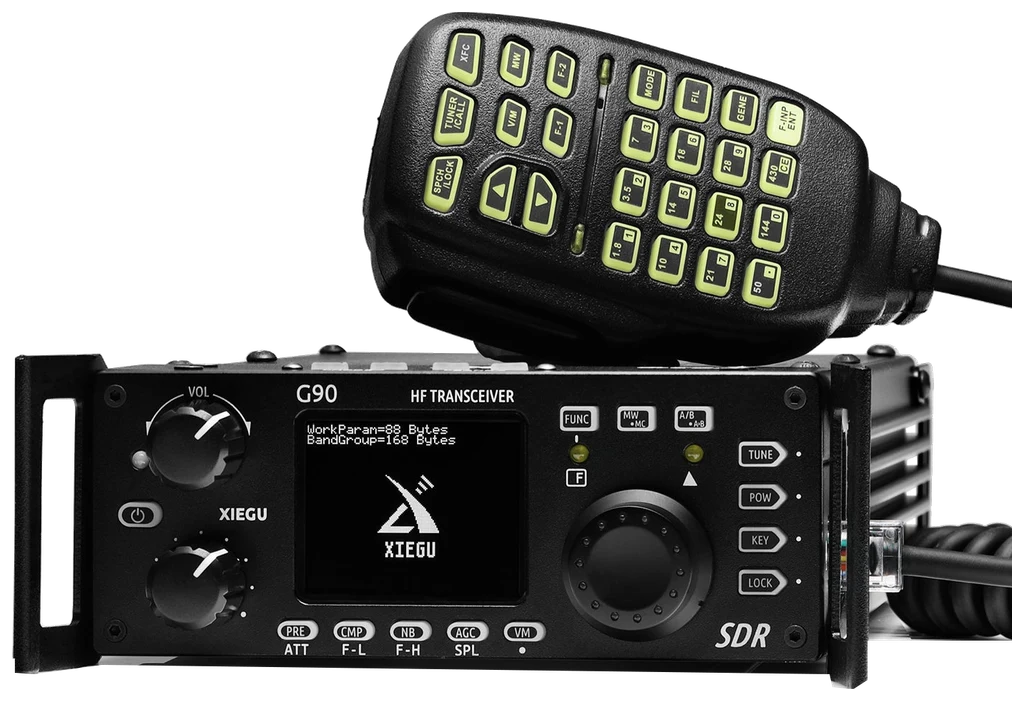
Checked 2026-09-09: Radioddity English G90 V5 (June 2025; 57 PDF pages, BASE 1.80b1/APP 1.80 basis), with G90/S V4.34 for the model-family scope; the distributor currently lists firmware 1.81. References use printed pages. Regional transmit limits and later firmware may differ. Only explicitly documented defaults are labeled as such. Guide v1.0; document review, not a hardware test.
Use this order as an operating checklist, not as a replacement for the radio manual. Controls and available options can vary by firmware and region.
With power off, check the rear KEY socket and the manual's stereo-plug wiring. Select CW after power-up, then choose the manual or paddle setting that matches your key.
Set KEY > QSK to OFF. Check each paddle separately, choose a comfortable speed and sidetone level, and confirm that the transmitter does not key.
Tune by ear first. Narrow the receiving bandwidth only after finding the wanted note; widen again if you lose it.
Long-press KEY. Watch the tuning indicator and compare the received text with what you hear. Correct tuning matters more than obtaining a full line of plausible letters.
Listen for a clear frequency, select suitable power, then enable QSK and check receive recovery with a short call. Confirm doubtful callsigns before entering the log.
Yes: G90/G90S has a built-in receive decoder. It turns received Morse into candidate text; it does not identify the station for you or judge your own keying. The internal electronic keyer is a separate sending function.
Choose CW or CWR and find one steady signal by ear. Avoid using a crowded pile-up as the first decoder test.
Long-press KEY. Tune in small steps until the CW tuning indicator follows the received elements.
The reviewed manual suggests 300 Hz bandwidth and a key-speed setting close to the incoming speed. Treat these as starting points, then compare with a wider filter.
Watch repeated calls or reports. If letters disagree with your ear, ask for a repeat rather than choosing the most plausible displayed callsign.
Retune to a distinct signal and check filter width. Do not enter random noise text into the log.
Widen temporarily, identify the wanted tone by ear, centre it, then narrow again. Check which station's rhythm the tuning indicator follows.
Use practice mode to listen to your own timing. The receive-decoder instructions do not establish a built-in scoring or self-copy function.
Search by control or menu path. References distinguish manufacturer manuals, distributor editions and firmware notes; documented defaults, source recommendations and CW599 advice are labeled separately.
Rear KEY socket; short-press KEY > M/L/RCW599 note: An external electronic keyer already creates its own timing, so use the manual setting. For paddles, test the dot and dash sides with QSK off before squeezing both. Incorrect plug wiring can hold transmit active.
Short-press KEY > SPEED; turn main tuning knobCW599 note: Use a familiar word to judge the result. If you rush the space between characters, lower the speed before changing the dot/dash ratio. This control does not make a straight key send automatically.
Short-press KEY > MODECW599 note: The difference is most noticeable when releasing a paddle squeeze. Send letters such as C and R slowly in practice mode; select the other mode only if the release behaviour conflicts with your technique.
FUNC > KEY > CW Volume / tone-frequency itemCW599 note: Choose a note you can listen to for several minutes, then reduce sidetone volume independently. Changing headphones calls for another level check. Do not use loudness to compensate for an incorrectly tuned received station.
Short-press KEY > QSK / QSK TimeCW599 note: On this radio, QSK off provides sidetone practice without RF. Enable it for an intended transmission, then listen for receive recovery after key-up. Check any external amplifier's timing independently before shortening the delay.
Short-press KEY > RatioCW599 note: Changing dash length cannot repair missing spaces between letters. Keep the ratio steady while assessing your timing; compare an audio recording before deciding that a different ratio is useful.
FUNC > KEY > B500; MFK > BPF1 / BPF2 (V5 p. 38)CW599 note: Keep the wanted note audible while narrowing. A filter that removes a neighbour may also remove an off-centre wanted signal. If decoding or listening becomes worse, widen the passband, retune and narrow again.
CW/CWR > long-press KEYCW599 note: Use repeated parts of an exchange to check whether the same characters appear consistently. A believable callsign is still only a candidate. The decoder reads received code; the electronic keyer controls what you send.
Hold main tuning knob to activate RITCW599 note: RIT can make a drifting station easier to hear without moving your transmit frequency. After the contact, check whether an offset remains before calling somebody else; do not assume the heard pitch proves the transmit frequency.
Short-press POW; turn main tuning knobCW599 note: Confirm the antenna and a clear frequency before keying. Check the indicated output and receive return with a short transmission; increasing power is not a remedy for a wrong key type or QSK still being off.
No matching settings. Try a shorter search or clear the search and category.
These are original operator-oriented starting points. They are not factory presets and intentionally avoid claiming model-specific default values.
A calm setup for learning the radio.
A patient workflow for signals close to noise.
For operators who need quicker station turnaround.
This page covers the G90/G90S documentation family. Regional transmit coverage and hardware revisions still need checking against your unit. G90N is outside this guide; do not use its firmware or menu instructions as a substitute.
No. Decoding helps read incoming signals, while a paddle and keyer form outgoing elements. You can listen without a key, but decoding text does not itself transmit a reply.
The reviewed G90 CW chapter documents a keyer and decoder, not a stand-alone CQ text-memory workflow. Frequency memories are not CW messages. Do not borrow the X6100/X6200 MSG procedure for the G90.
Check hardware, region and firmware against the manufacturer and the clearly identified distributor resources. Manual languages are stated in the links. This page provides original operating explanations and does not host or reproduce manuals.
Search and filters run locally in your browser and do not connect to or control the radio. Version 1.0 (2026-09-09): bilingual CW guide, decoder workflow, real product cutout and source references. Revisions are retained in site Git and deployment backups; no separate archived page is available.