
Connect and select
Select CW and configure the front or rear KEY input.
FTDX101D and FTDX101MP share this CW operating interface. Their power configurations and fitted receiver options differ. Use this guide to establish a keying baseline, identify the receiver being adjusted and control received-text decoding.
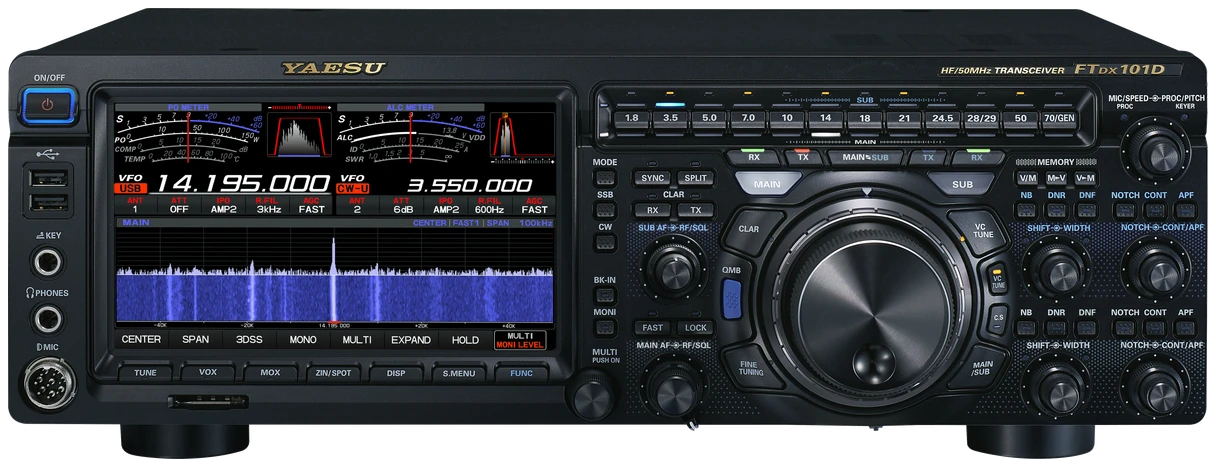
English US Operation Manual 2406R-US-1; D/MP family; output power and receiver options differ by model. Checked 2026-09-13; original firmware; printed manual pages unless marked PDF.
Use this order as an operating checklist, not as a replacement for the radio manual. Controls and available options can vary by firmware and region.
Select CW and configure the front or rear KEY input.
Keep BK-IN off; use MONI to check the paddle.
Set MIC/SPEED and a comfortable monitor level.
Choose MAIN/SUB, tune first, then try WIDTH/APF and DECODE.
Verify the transmit VFO and power before enabling BK-IN.
FTDX101 uses the received speed setting and a decode threshold. Set both for the station you are listening to; decoded text still needs ear confirmation.
Turn MIC/SPEED close to the incoming CW speed.
Press FUNC and touch DECODE.
Center the wanted note. Touch DEC LVL and adjust MULTI if idle noise makes text.
Compare TFT text to the signal; DEC OFF stops decoding.
Return to the receive-decode setting above, confirm a steady audible CW signal and retune before changing more parameters. Transmit echo alone does not confirm receive decoding.
Listen to one complete call and compare it with the display. Fading and irregular spacing can defeat the decoder; request a repeat and copy by ear instead of completing an uncertain callsign from guesses.
Center the wanted signal first, then narrow the receive filter gradually. If the wanted tone disappears, widen the filter and tune again. Stop adjusting when a clear tone and stable text agree.
Search by setting or menu path. Manufacturer defaults and recommendations are labeled separately from CW599 advice; references identify the checked manual or software version.
FUNC > CW SETTING > KEYER > F/R KEYER TYPECW599 note: Choose the row for the socket actually used. OFF accepts direct keying; use an electronic-keyer mode for a paddle. Keep BK-IN off while confirming independent dots and dashes.
Manual reference: FTDX101MP/D Operation Manual 2406R-US-1, pp. 58–62, 97–98
MIC/SPEEDCW599 note: Press MIC/SPEED to enable the internal keyer and rotate to adjust speed. For receive decoding, match the received speed closely; a comfortable transmit speed can be different from a fast caller’s speed.
Manual reference: FTDX101MP/D Operation Manual 2406R-US-1, pp. 58–62, 97–98
BK-IN off; MONI; hold MONI > MULTICW599 note: Enable the monitor and set a modest level while keying without RF. Verify the BK-IN indicator is off; a monitor tone by itself says nothing about whether RF is being radiated.
Manual reference: FTDX101MP/D Operation Manual 2406R-US-1, pp. 58–62, 97–98
FUNC > CW SETTING > MODE CW > CW BK-IN TYPE / CW BK-IN DELAYCW599 note: Begin with SEMI and listen to the recovery after a short word. Change to FULL only after the amplifier and switching chain are checked; longer delay may sound calmer for ordinary QSOs.
Manual reference: FTDX101MP/D Operation Manual 2406R-US-1, pp. 58–62, 97–98
FUNC > CW SETTING > KEYER > CW WEIGHTCW599 note: Use the standard ratio while checking your paddle timing. If an exchange sounds crowded, fix missing character gaps first; changing weight cannot create space between letters you run together.
Manual reference: FTDX101MP/D Operation Manual 2406R-US-1, pp. 58–62, 97–98
MAIN/SUB selection > WIDTH / APF / CONT/APFCW599 note: Tune the desired signal first and confirm which receiver is being adjusted. Narrow WIDTH, then compare APF on/off; return the peak toward center if the wanted note becomes quieter.
CW > FUNC > DECODECW599 note: Match MIC/SPEED to the incoming CW and read the TFT text. If idle noise produces characters, open DEC LVL and adjust MULTI. Use DEC OFF to stop the decoder when you prefer listening alone.
FUNC > REC/PLAY; KEYER > CW MEMORY 1–5CW599 note: Choose the intended memory method before recording. For paddle entry use MEM and the target slot, then MEM to finish. Play with BK-IN off first and press the same playback key to stop.
Manual reference: FTDX101MP/D Operation Manual 2406R-US-1, pp. 58–62, 97–98
FUNC > CW SETTING > MODE CW > PC KEYINGCW599 note: Select the line used by your interface or logging software, then test with RF disabled. Do not infer correct keying from a working CAT frequency display; these are separate controls.
No matching settings. Try a shorter search or clear the search and category.
These are original operator-oriented starting points. They are not factory presets and intentionally avoid claiming model-specific default values.
Check one change at a time.
Keep the wanted signal audible.
Leave a clear path back to receiving.
Yes. Select CW, match MIC/SPEED to the caller and open FUNC > DECODE.
The decode instructions require the speed setting to be close to the received signal. Retune and match speed before raising DEC LVL.
Check MAIN/SUB selection before changing WIDTH or APF; the receivers have independent adjustments.
Use the manufacturer-controlled product and support pages to verify your region, firmware, menus, connector wiring, operating limits, and safety information. CW599 does not host, mirror, or reproduce the manual.
Search and filters run locally in your browser and do not connect to a radio. Version 1.0 (2026-09-13): bilingual guide and sourced product photo. Revisions are retained in site Git and release backups; no separate archived page.