
Prepare the Field head
Connect the key to KEY and select CW-U. Leave BK-IN off for the initial check and select the keyer type that matches the hardware.
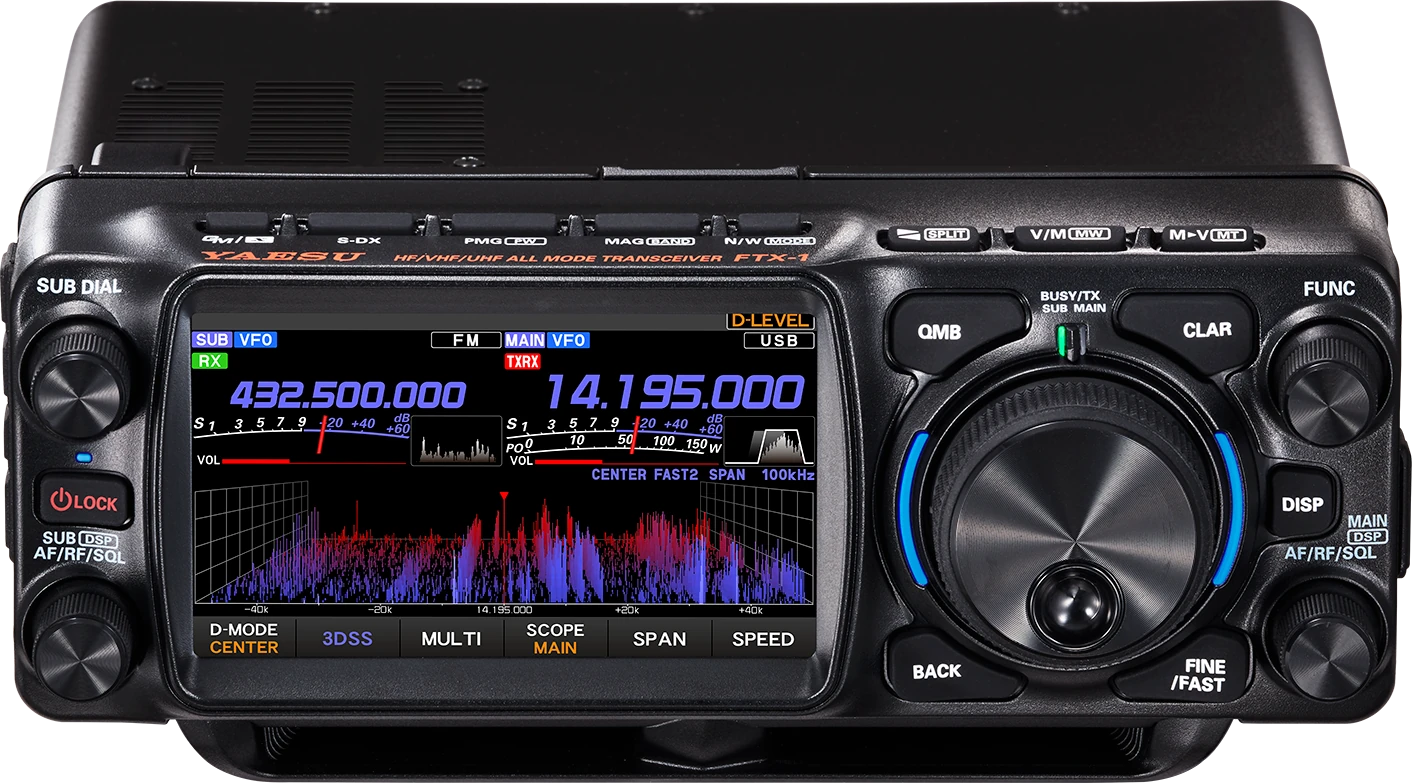
A CW workflow for the FTX-1 family: prepare the key at home, tune by ear in the field, and keep memory calling under control. The Field head and Optima package share the CW workflow; power, accessories and regional packages must be checked separately.
Checked 2026-09-06: English Operating 2506E-DS (88 PDF pages), Advance 2506-B (91 PDF pages). References use printed page numbers. CW controls follow these English manuals; package names, power and band availability vary by market. Later firmware may change labels. Guide v1.1; no physical radio test.
Use this order as an operating checklist, not as a replacement for the radio manual. Controls and available options can vary by firmware and region.
Connect the key to KEY and select CW-U. Leave BK-IN off for the initial check and select the keyer type that matches the hardware.
Adjust MONI LEVEL, CW PITCH and CW SPEED. Test dots, dashes and spacing before packing the station or connecting external equipment.
Use your ear and the tuning indicator; ZIN is an aid, not proof of identity. Narrow the receiver only after confirming the desired note.
Check SEMI and set a comfortable BK-DELAY. Listen before a short low-power call and confirm receive recovery before considering FULL.
Choose TEXT or MESSAGE for each memory, audition it with BK-IN off, and check contest numbering before enabling on-air playback.
Search the model-specific CW controls below. Menu labels and ranges are drawn from official documentation; the notes are original CW599 operating guidance.
Hold FUNC > CW SETTING > KEYER > KEYER TYPECW599 note: Use OFF for a straight key or an external keyer’s completed output. Test the release behaviour of A/B/Y in sidetone to match your habit. ACS enforces character spacing; it does not choose your word spacing.
Hold FUNC > CW SETTING > KEYER > KEYER DOT/DASHCW599 note: Use REV if the two paddle sides are reversed for your hand. Test the sides separately with BK-IN off. The operating manual notes that this reversal does not change BUG and OFF behaviour.
FUNC > CW SPEED; rotate FUNCCW599 note: Choose a speed you can sustain, not merely the maximum the radio offers. Send a short test in sidetone and listen for clean character gaps before making a call.
Hold FUNC > MONI LEVEL; rotate FUNCCW599 note: Set the monitor level before practising, with BK-IN off. This is loudness, not CW pitch; recheck after changing headphones so a loud sidetone does not hide the received station.
Hold FUNC > CW menu page > CW PITCH; rotate FUNCCW599 note: Choose the tone you can follow comfortably before using a narrow filter. Compare your sidetone with the received note; MONI LEVEL controls loudness separately. Retune the station if it no longer sits at the chosen reference tone.
Hold FUNC > CW SPOT / ZINCW599 note: Compare the wanted station with the reference tone before narrowing. ZIN adjusts tuning automatically, but a crowded passband can contain several stations; confirm the intended signal remains selected.
Hold FUNC > CW SETTING > KEYER > CW WEIGHTCW599 note: Keep the normal three-to-one dash ratio while learning. Changing weight cannot fix characters sent without adequate gaps; record and compare before adjusting.
Hold FUNC > CW SETTING > MODE CW > CW BK-IN TYPECW599 note: SEMI holds transmit after key-up; FULL listens between elements. BK-IN must also be enabled for automatic transmit switching. Confirm the station’s external switching before choosing FULL.
Hold FUNC > BK-DELAY; rotate FUNCCW599 note: Increase the hang time if switching interrupts your natural character rhythm; shorten it gradually if replies are missed. Verify by listening after key-up. It does not set the RF envelope shape.
Hold FUNC > CW SETTING > MODE CW > QSK DELAY TIMECW599 note: This delay is before the keying signal, distinct from receive hang time. The manual fixes it at 15 ms at 45 WPM or above regardless of the selected value; verify amplifier compatibility at your actual speed.
Hold FUNC > CW SETTING > MODE CW > NAR WIDTHCW599 note: This sets the width recalled by NAR in CW. A very narrow setting helps only when the note is centred; if copy deteriorates, widen the passband and retune before increasing audio gain.
Hold FUNC > OPERATION SETTING > RX DSP > APF WIDTHCW599 note: The audio peak follows CW PITCH. Choose the width after tuning the station; compare intelligibility at similar volume. If a narrow peak makes the signal difficult to follow, return to MEDIUM or WIDE and check tuning.
Hold FUNC > CW SETTING > MODE CW > PC KEYINGCW599 note: Select the control line used by your software and verify it separately from RPTT SELECT. Test with RF inhibited; a working CAT connection alone does not prove the keying line is correct.
Hold FUNC > CW SETTING > KEYER > CW MEMORY 1–5CW599 note: TEXT uses entered characters; MESSAGE captures paddle entry. Open MESSAGE to record and audition with BK-IN off. Review your callsign and spacing before enabling on-air playback.
Hold FUNC > CW SETTING > KEYER > CONTEST NUMBERCW599 note: A # in memory text inserts the contest number. Confirm it against your log before sending; DECnnnn on the memory screen corrects an extra increment. Use the contest’s required exchange.
No matching settings. Try a shorter search or clear the search and category.
These are original operator-oriented starting points. They are not factory presets and intentionally avoid claiming model-specific default values.
A calm setup for learning the radio.
A patient workflow for signals close to noise.
For operators who need quicker station turnaround.
The common CW controls are covered here. The official US Optima package includes the SPA-1 amplifier; the Field head can operate separately. Check the actual package, supply, band and regional manual rather than treating every variant as a 100 W radio.
MESSAGE records your paddle timing; poor spacing can be stored with it. Re-record slowly or use TEXT entry. Audition with BK-IN off before transmitting.
CAT frequency control, RPTT and PC KEYING are separate settings. Match the software’s COM port and control line, change one assignment at a time, and test with RF inhibited.
Use the manufacturer-controlled product and support pages to verify your region, firmware, menus, connector wiring, operating limits, and safety information. CW599 does not host, mirror, or reproduce the manual.
Setting search and filters run in your browser and do not connect to or control your radio. Version 1.1 (2026-09-07) adds official transparent product images and language-specific resource labels; 1.0 introduced the bilingual guide. revisions are retained in site Git and deployment backups, with no separate archived guide page yet.