If you are learning CW, setting up a radio menu, researching electronic keys, or comparing different amateur radio callsigns, you will probably come across the term CW Weight.
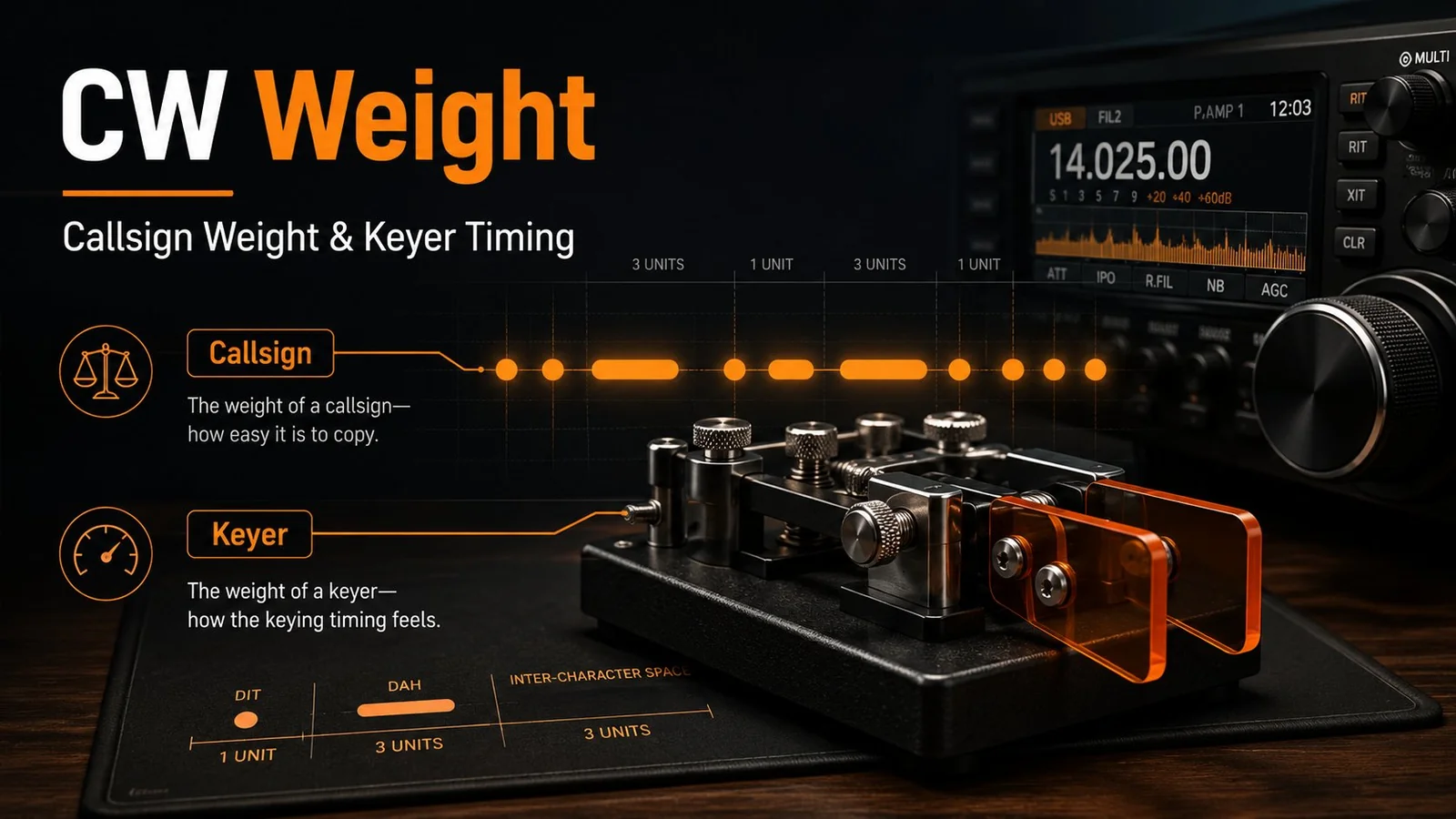
At first it can be confusing, because "weight" here does not mean physical mass. In amateur radio, CW weight usually refers to one of two different things:
The time a callsign takes to send in Morse code, often called callsign weight.
A setting in a radio or electronic keyer that adjusts the timing ratio between dots and dashes.
Both ideas are related to Morse code timing, but they describe very different things.
What does CW mean?
CW stands for Continuous Wave.
In amateur radio, CW normally means communication using Morse code. A Morse character is built from:
Dits, also called dots
Dahs, also called dashes
The space between elements inside a character
The space between characters
The space between words
Because different letters contain different numbers of dots and dashes, some characters take much longer to send than others. That difference is the root of the first meaning of CW weight.
Meaning 1: Callsign CW weight
When hams talk about the CW weight of a callsign, they usually mean:
The time, or number of Morse timing units, needed to send the full callsign once.
For example:
E = .
T = -
J = .---
Q = --.-
The letter E is extremely quick to send. The letter J takes much longer. So two callsigns with the same number of characters can have very different CW weights.
This idea is also called:
Callsign weight
CW callsign weight
Morse code weight
Why callsign weight matters
For casual operation it usually does not matter very much. But for operators who spend a lot of time on CW, a lighter callsign can have real advantages.
Faster transmission. A lighter callsign takes less time to send. The difference may be tiny during one QSO, but after hundreds or thousands of contacts in a contest the time savings add up.
Easier recognition. Some Morse combinations have a clear, distinctive rhythm. A good CW callsign is not necessarily just short; it can also have a rhythm that is easy for other operators to recognize.
Easier manual sending. If you use a straight key, paddle, bug, or sideswiper, some callsigns simply feel more comfortable to send. That feel is partly subjective, but Morse timing plays an important role.
Is a short callsign always lighter?
No. Character count and CW weight are not the same thing.
Relatively short characters include:
E.
I..
T-
A.-
N-.
Longer characters include:
J.---
Q--.-
Y-.--
0-----
So a five-character callsign can sometimes be quicker to send than a four-character callsign, depending on the letters and numbers involved. That is one reason CW enthusiasts study callsign weight when choosing a vanity callsign.
Meaning 2: CW weight in an electronic keyer
The second common meaning of CW weight appears in transceiver and electronic keyer menus.
In this case, CW weight describes the relative duration of the key-down and key-up portions of Morse elements.
In standard Morse timing:
A dit is one time unit.
A dah is three time units.
The space between elements of the same character is one time unit.
An electronic keyer normally generates these timings automatically. A weight setting changes the relationship slightly.
What happens when you change keyer weight?
Increasing the weight generally makes the transmitted dits and dahs sound slightly heavier or more "filled in." Decreasing the weight makes them sound lighter or more open.
The exact behavior depends on the radio or keyer manufacturer. If your radio manual includes a CW weight setting, check the manufacturer's explanation for the specific range and effect.
Why adjust keyer weight?
Most operators can leave the setting at its default. But CW weight adjustment can be useful for:
Matching a personal sending preference
Matching the feel of a particular keyer
Changing the perceived rhythm of the transmitted CW
Compensating for timing characteristics in external equipment
Reproducing a particular CW sending style
Very large changes are usually unnecessary. Good Morse code depends more on stable, clear timing than on unusual weighting.
CW weight is not the same as CW speed
This is a common point of confusion.
CW speed is normally measured in words per minute, or WPM. For example:
10 WPM
15 WPM
20 WPM
25 WPM
Increasing CW speed makes the entire Morse transmission faster.
CW weight does not simply change speed. If we are talking about callsign weight, it describes how long a particular callsign takes to send because of its character composition. If we are talking about keyer weight, it describes the timing balance of the generated Morse elements.
How callsign weight is calculated
A callsign weight calculator assigns timing units to each Morse element and adds them up. The most common base rules are:
Dit = 1 unit
Dah = 3 units
Space between elements of the same character = 1 unit
Space between characters = 3 units
Using those rules, two callsigns can be compared directly. For someone choosing a vanity callsign, this can be surprisingly useful: a callsign that looks shorter on paper is not always shorter on the air.
Does CW weight matter for beginners?
If you are learning Morse code, CW weight should not be a major concern yet. Focus first on:
Recognizing characters by sound
Maintaining correct rhythm
Sending clean dits and dahs
Building comfortable copy speed
Developing your CW ear
Once you become more experienced, you will naturally begin to notice that some callsigns, abbreviations, and words have very different Morse rhythms. That is when CW weight becomes intuitive.
Practice with CW599 tools
If you want to train your ear for callsign rhythm, the CW599 Callsign Trainer lets you listen to random callsigns at a speed you choose. If you are still building character recognition, the CW599 Letter Trainer focuses on single letters and helps you reach a stable copy speed before moving to callsigns and words.
Final thoughts
The phrase CW weight has two different meanings in amateur radio.
When talking about callsigns, it describes how long or "heavy" a callsign is when transmitted in Morse code. When talking about a radio or electronic keyer setting, it describes the timing balance of Morse elements.
Understanding the difference helps avoid confusion when reading radio manuals, comparing callsigns, or configuring a CW keyer. And if you enjoy CW operation, calculating the weight of your own callsign is a fun way to look at Morse code from a completely different perspective.
A CW signal report often arrives as three quick digits: 599, 579, 339, or something nearby. Once you know that the digits stand for Readability, Strength, and Tone, the code looks simple. Giving a useful report, however, requires more than repeating 599 to every station.
RST is a compact description of what you actually receive. It tells the other operator whether the message is readable, how strong the signal appears at your receiver, and whether the CW tone sounds clean. The three observations are related, but they are not the same measurement.
The three parts of an RST report
The order is always:
R  S  T
5  7  9
The first digit uses a scale of 1 to 5. The second and third use scales of 1 to 9. For CW, all three digits are normally sent. Voice contacts usually use only R and S.
Readability answers one practical question: How much of the message can you copy?
R
Practical meaning
1
Unreadable
2
Barely readable; occasional words distinguishable
3
Readable with considerable difficulty
4
Readable with practically no difficulty
5
Perfectly readable
Readability is not the same as signal strength. A weak but clean signal in a quiet band may be perfectly readable and deserve R5. A strong signal under heavy interference may be difficult to copy and deserve R3 or R4.
S: Signal strength
Strength describes how strong the signal appears at your receiver.
S
Traditional description
1
Faint; barely perceptible
2
Very weak
3
Weak
4
Fair
5
Fairly good
6
Good
7
Moderately strong
8
Strong
9
Extremely strong
Your receiver's S-meter can help, but an RST report is not a laboratory calibration. S-meters, preamplifiers, attenuation, bandwidth, antennas, noise levels, and local interference all affect the indication. Report what you receive at your station rather than trying to produce an absolute field-strength measurement.
T: Tone
Tone describes the quality and stability of the received CW note.
T
Practical interpretation
1–3
Very rough, broad, or strongly modulated tone
4–6
Noticeable roughness, ripple, or unwanted modulation
7
Near-pure tone with a small imperfection
8
Nearly perfect tone
9
Clean, stable, pure tone
The detailed historical scale refers to transmitter problems that were common when power supplies and oscillators were less stable. Modern equipment usually produces T9 unless it is misadjusted, overdriven, faulty, or affected by another technical problem.
The IARU publication Ethics and Operating Procedures for the Radio Amateur notes that modern operators often use only a few meaningful tone levels. It also identifies chirp and key clicks as common CW defects worth reporting clearly.
What 599 means
599 means:
R5: perfectly readable
S9: extremely strong
T9: clean and stable tone
It is the highest ordinary RST report. If the station is loud, effortless to copy, and clean, 599 is appropriate.
In everyday contacts, 599 should not be treated as a required greeting. A station can still have an excellent QSO with a report of 559, 579, or 339. An honest report gives the other operator more useful information about propagation, antennas, power, and station performance.
What 579 means
579 means:
R5: perfectly readable
S7: moderately strong
T9: clean tone
This is a common realistic report. The signal is easy to copy and sounds clean, but it is not extremely strong. If you can read every character without effort while the S-meter sits below S9, 579 may describe the contact better than 599.
What 339 means
339 means:
R3: readable with considerable difficulty
S3: weak
T9: clean tone
The signal itself is technically clean, but it is weak and difficult to copy. Fading, noise, interference, or limited propagation may force you to request repeats.
A 339 report is not an insult. It tells the transmitting operator that the signal is reaching you and a contact may still be possible, but conditions are difficult. The useful response may be to slow down, repeat important information, adjust the antenna, or try again at another time.
How to send the report in a QSO
A normal exchange can be short:
UR RST 579 579
UR means "your." Repeating the report helps when conditions are noisy. In a compact QSO, one repetition may be enough:
TNX FER CALL UR RST 559
The other operator may acknowledge it with:
R R TNX FER 559
You can practice the order of a contact in the CW599 QSO Simulator. It places RST between the callsign exchange and the name/QTH portion, which helps make the sequence automatic without turning the report itself into a meaningless habit.
Give readability from your ears, not only the meter
The most common beginner mistake is to let the S-meter determine all three digits. The meter may help with S, but it cannot decide R or T for you.
Consider these situations:
A signal peaks at S3 in a quiet band and every character is clear: 539 or 559 may be reasonable.
A signal reaches S8 but is covered by intermittent QRM: readability may fall to R3 or R4.
A strong signal has obvious chirp or clicks: strength can be high while tone quality is not T9.
Deep fading changes the signal during the transmission: report an overall useful impression rather than chasing every meter movement.
Receiving bandwidth also changes the experience. A narrow filter may improve readability in noise, while a very narrow or poorly centered filter can make an otherwise good signal sound weak. Use a normal operating setup and apply consistent judgment.
Chirp, clicks, hum, and other tone problems
A CW signal may change pitch during each element. This is called chirp. Sharp keying transients that spread beyond the intended signal are usually called key clicks. Hum or ripple can make the note sound rough or modulated.
Traditional suffixes include C for chirp and K for clicks, such as 579C or 589K. Those suffixes are not universally understood today. If the problem is important, plain words are clearer:
UR SIG HAS CHIRP
or:
PSE CHECK KEY CLICKS
Be factual and courteous. Do not diagnose the transmitter from one brief reception. First make sure the sound is not caused by your own receiver settings, noise blanker, AGC, overload, or interference. If the defect remains obvious, a calm report can help the other operator find a station problem.
Why contests often use 5NN
In many CW contests, 5NN is sent instead of 599. N is a cut number for 9, so:
5NN = 599
The shorter form saves time in a rapid, predictable exchange. In that context, the report often functions as a standard part of the contest format rather than a detailed assessment of the signal. The rules of the specific event still determine what must be sent and logged.
Do not assume that 5NN should replace every report in an ordinary QSO. Outside a contest, sending the digits that match what you hear is more informative. Beginners should also become comfortable copying full numbers before relying on contest abbreviations.
A practical way to choose an RST
Use this sequence:
Choose R first. Could you copy all of the message, most of it, or only fragments?
Estimate S. Use the meter as a reference, then consider noise, fading, and your normal receiver setup.
Listen to T. Is the note stable and clean? Is there obvious roughness, chirp, hum, or clicking?
Send a stable overall report. Do not change digits for every momentary fade.
Add words when needed.QSB, QRM, QRN, CHIRP, or CLICKS can explain why copying is difficult.
For example:
UR RST 449 QSB
This says the signal is readable with little difficulty, fair in strength, clean in tone, and affected by fading.
Practice honest reporting
When listening to code practice, WebSDR receivers, or live amateur signals, pause before looking at the meter and estimate R first. Then inspect strength and listen specifically for tone quality. This separates the three judgments.
The CW599 Callsign Trainer can strengthen the copying side of the process. Better callsign recognition makes it easier to judge readability instead of confusing unfamiliar character groups with a weak signal.
RST is not a score awarded to the other station. It is a short field report from one receiving position at one moment. Used honestly and courteously, three digits can tell an operator much more than a routine 599.
When you first listen to a real CW contact, you may hear something like:
GM OM TKS FER CALL UR RST 579 FB CPY
You may know every Morse character and still struggle to understand the sentence.
That is because experienced operators rarely send complete written English. CW communication makes extensive use of prosigns, Q codes, abbreviations, number codes, and established operating patterns.
For example:
GM means Good Morning.
FB means Fine Business, or very good.
UR means Your.
RST 579 is a signal report.
CPY means Copy.
73 means Best regards.
Strictly speaking, CW does not have a separate grammar of its own. What operators informally call “CW grammar” is a compact international operating language built from procedural signals, Q codes, shortened words, and shared conventions. The IARU operating guide identifies Q codes, abbreviations, and prosigns as the primary shortcuts that make CW communication faster and more efficient. (IARU Region 1)
This guide covers the internationally recognized expressions you are most likely to hear during amateur-radio CW contacts. It does not attempt to include every local net code, club abbreviation, or specialized traffic-handling signal.
Prosigns control the procedure of a contact. They may mean “wait,” “go ahead,” “end of transmission,” or “end of contact.”
A true two-letter prosign is normally sent as one continuous Morse character without the usual space between the letters. It may be written as <AR> or with a bar above the letters.
Q Codes
Q codes are three-letter groups beginning with Q:
QTH: location
QRM: interference
QRS: send more slowly
QSL: acknowledgment
QSO: a radio contact
Adding a question mark normally changes a Q code into a question:
QRL?
Is this frequency in use?
QRL
This frequency is in use.
ARRL describes this question-versus-statement convention in its operating references. (ARRL)
Common CW Abbreviations
These are shortened ordinary words:
GM = Good Morning
FB = Fine Business
TKS = Thanks
FER = For
UR = Your
WX = Weather
They are sent as normal letters with normal spacing.
Number Codes and Contest Shorthand
Examples include:
73: Best regards
88: Love and kisses
5NN: 599
T: 0
A: 1
N: 9
Some are heard in ordinary ragchews, while others are mainly used in contests and DX pileups.
Essential CW Procedural Signals
Signal
Meaning
Typical use
CQ
General call to any station
CQ CQ DE BA7MTH BA7MTH AR
DE
From, this is
W1ABC DE BA7MTH
<AR>
End of message or transmission
Common at the end of a CQ
K
Go ahead
Invites a response
KN
Go ahead, named station only
Excludes other callers
BK
Break
Fast back-and-forth exchange
<AS>
Wait or stand by
Requests a short delay
<SK>
End of contact
Ends the complete QSO
<CL>
Closing the station
Sent before leaving the air
<BT> or =
Separator or thinking pause
Separates subjects or text sections
<HH>
Error
Cancels an error before retransmission
SOS
Distress signal
Genuine emergencies only
Under the strict IARU definition, a prosign combines two characters without an inter-character space. AR, AS, SK, CL, and HH are therefore true prosigns. BK and KN are sent with normal spacing between their two letters, so the IARU guide does not classify them as true combined-character prosigns, although many operating guides group them together informally.
AR, K, KN, and SK
<AR> means that the current transmission or message has ended. It is especially appropriate at the end of a general call:
CQ CQ DE BA7MTH BA7MTH AR
At this point there is no specific station to whom the frequency is being handed, so the IARU guide recommends AR rather than K at the end of a CQ. (IARU Region 1)
K hands the conversation to the other station:
W1ABC DE BA7MTH K
KN means that only the station just named should answer:
W1ABC DE BA7MTH KN
<SK> ends the entire contact:
TKS FER QSO 73 ES CUL W1ABC DE BA7MTH SK
<CL> indicates that the operator is also closing the station:
W1ABC DE BA7MTH SK CL
The IARU guide recommends avoiding combinations such as AR K, AR KN, and AR SK, because they unnecessarily combine “end of transmission” with another closing or handover instruction. (IARU Region 1)
Common Amateur-Radio Q Codes
Frequency, Interference, and Propagation
Code
Question
Statement
QRG
What is my exact frequency?
Your exact frequency is…
QRH
Is my frequency varying?
Your frequency is varying
QRL
Are you busy? Is the frequency in use?
I am busy; the frequency is in use
QRM
Am I being interfered with?
I am experiencing interference
QRN
Are you troubled by static?
I am troubled by static or natural noise
QSB
Are my signals fading?
Your signals are fading
QSA
What is my signal strength?
Your strength is 1 through 5
Before calling CQ on an apparently clear frequency, send:
QRL?
Then listen before transmitting again. The IARU guide identifies this as an important operating practice. (IARU Region 1)
Speed, Power, and Operating Status
Code
Common meaning
QRO
Increase power; also used informally for high-power operation
QRP
Reduce power; also used for low-power operation
QRQ
Send faster
QRS
Send more slowly
QRT
Stop sending, close down, or leave the air
QRV
Ready
QRX
Wait, call again later, or call again at a specified time
QSK
Break-in operation; reception between transmitted elements
Calling and Communication
Code
Common meaning
QRZ?
Who is calling me?
QSO
Communicate with another station; a radio contact
QSP
Relay a message
QSX
Listen on a specified frequency
QSY
Change frequency
QTC
Messages or formal traffic to send
QRU
I have nothing for you
QSL
Acknowledge receipt; confirmation of a contact
QTH
Station location
QTR
Correct time
QRA
Station name, although NAME is more common in casual QSOs
ARRL’s operating references list QRG, QRL, QRM, QRN, QRO, QRP, QRQ, QRS, QRT, QRV, QRX, QRZ, QSB, QSK, QSL, QSO, QSP, QSX, QSY, QTC, QTH, and QTR among the commonly used amateur Q signals. (ARRL)
QRZ Is Not CQ
QRZ? means:
Who is calling me?
It does not mean “Is anyone there?” To invite calls from any station, use CQ.
QSL can appear in several related ways:
QSL?
Can you acknowledge receipt?
QSL
I acknowledge receipt.
QSL VIA BURO
Please exchange the QSL card through the bureau.
Common CW Abbreviations
Greetings and Social Expressions
Abbreviation
Full expression
Meaning
GM
Good Morning
Morning greeting
GA
Good Afternoon
Afternoon greeting; may also mean Go Ahead
GE
Good Evening
Evening greeting
GN
Good Night
Good night
GD
Good / Good Day
Good
FB
Fine Business
Very good, excellent
UFB
Ultra Fine Business
Extremely good
GUD
Good
Good
VY
Very
Very
HI
Laughter
The CW equivalent of “ha ha”
HNY
Happy New Year
New Year greeting
MX
Merry Christmas
Christmas greeting
XMAS
Christmas
Christmas
GL
Good Luck
Good luck
CU
See You
See you
CUL
See You Later
See you later
73
Best Regards
Friendly closing wishes
88
Love and Kisses
Traditionally used for someone close
In CW, FB does not mean Facebook. Fine Business is a traditional telegraph expression meaning that something is good, satisfactory, or excellent.
FB CPY UR SIGS
means:
I am copying your signals very well.
The IARU abbreviation list includes FB, UFB, GM, GA, GE, GN, HI, HNY, MX, 73, and 88. It also notes that 73 is already a complete expression and should not be pluralized as “73s.” (IARU Region 1)
Thanks, Confirmation, and Requests
Abbreviation
Full expression
Meaning
TU
Thank You
Thank you
TKS
Thanks
Thanks
TNX
Thanks
Thanks
PSE
Please
Please
SRI
Sorry
Sorry
R
Roger / Received
Received and understood
RR
Roger Roger
Fully received
CFM
Confirm
Confirm
OK
All correct
Correct
CPY
Copy
Copy or understand
CPI
Copy
Copy or understand
AGN
Again
Again
RPT
Repeat
Repeat
RPRT
Report
Report
NIL
Nothing
Nothing received or nothing available
HW
How
How
Common combinations include:
PSE AGN
Please send it again.
PSE QRS
Please send more slowly.
SRI NIL CPY
Sorry, I copied nothing.
HW CPY?
How are you copying me?
TKS FER RPRT
Thanks for the report.
Connecting Words
Abbreviation
Full expression
Meaning
DE
From
From, this is
ES
And
And
FER
For
For
UR
Your
Your
U
You
You
WID
With
With
ABT
About
About or approximately
B4
Before
Before
BTW
By The Way
By the way
HR
Here
Here
NW
Now
Now
MNI
Many
Many
HVE, HV
Have
Have
HPE
Hope
Hope
TMW, TMRW
Tomorrow
Tomorrow
NR
Number / Near
Meaning depends on context
DR
Dear
Dear
Examples:
MNI TKS FER UR CALL
Many thanks for your call.
WX HR SUNNY ES WARM
The weather here is sunny and warm.
HPE CU AGN
I hope to contact you again.
Operators, Equipment, and Station Information
Abbreviation
Full expression
Meaning
OM
Old Man
Traditional friendly term for a male amateur
YL
Young Lady
Female operator
XYL
Wife / Spouse
Traditional term for a spouse
OP, OPR
Operator
Operator
ANT
Antenna
Antenna
PWR
Power
Transmitter power
TX
Transmitter / Transmit
Transmitter or transmitting
RX
Receiver / Receive
Receiver or receiving
TRX, XCVR
Transceiver
Transceiver
RIG
Radio equipment
Station equipment
SIG, SIGS
Signal / Signals
Signal or signals
FREQ
Frequency
Frequency
CNDX, CONDX
Conditions
Propagation or operating conditions
WX
Weather
Weather
TEMP
Temperature
Temperature
WPM
Words Per Minute
Sending speed
LP
Long Path
Long-path propagation
SP
Short Path
Short-path propagation
SKED
Schedule
Arranged contact
WKD
Worked
Contacted
WKG
Working
Working or contacting
HRD
Heard
Heard
The IARU list includes ANT, PWR, TX, RX, TRX, RIG, WX, OP, OPR, LP, SP, and SKED among its commonly used CW abbreviations. (IARU Region 1)
RST Reports and 5NN
A CW signal report normally contains three digits:
R — Readability: 1 to 5
S — Signal strength: 1 to 9
T — Tone quality: 1 to 9
For example:
UR RST 579
means readability 5, strength 7, and tone 9.
UR RST 599
indicates a fully readable, strong signal with a clean tone.
In contests, 599 is often shortened to:
5NN
The Morse character N is much shorter than the numeral 9. ARRL contest material describes 5NN as a widely understood abbreviation for 599. (IARU Region 1)
Common Cut Numbers
Letter
Number
A
1
N
9
T
0
For example:
5NN ATT
can mean:
599 100
ARRL advises operators not to overuse unusual cut numbers. While 5NN and the substitutions A, N, and T are commonly recognized, excessive compression may cause requests for repeats and eliminate any time saved. (ARRL)
DX, Pileup, and Contest Expressions
Expression
Meaning
DX
A distant or foreign station
CQ DX
General call for distant stations
CQ JA
Call for Japanese stations
CQ NA
Call for North American stations
CQ EU
Call for European stations
CQ TEST
Contest call
TEST
Contest
UP
Listening above the transmit frequency
DWN
Listening below the transmit frequency
UP 2
Listening about 2 kHz higher
UP 5/10
Listening 5 to 10 kHz higher
QSX 7015
Listening on 7015 kHz
SPLIT
Transmitting and receiving on different frequencies
NR
Contest serial number
ZONE
Contest zone
DUP
Duplicate contact
NIL
Not copied or not found in the log
BURO
QSL bureau
DIRECT
Direct postal QSL exchange
CQ TEST is a contest call, with TEST serving as an abbreviation for Contest. A DX station working split may send UP, DWN, UP 5, or QSX 3515 after each contact to indicate where it is listening. (ARRL)
Anatomy of a Typical CW QSO
The following example uses BA7MTH and W1ABC.
Checking the Frequency
QRL?
If nobody answers, the operator begins calling.
Calling CQ
CQ CQ DE BA7MTH BA7MTH AR
Translation:
Calling any station. This is BA7MTH, BA7MTH. End of call.
Answering
BA7MTH DE W1ABC W1ABC AR
Translation:
BA7MTH, this is W1ABC.
First Information Exchange
W1ABC DE BA7MTH GM TKS FER CALL
UR RST 579 579
NAME JANGEL JANGEL
QTH SHANTOU SHANTOU
HW CPY?
W1ABC DE BA7MTH K
In normal English:
W1ABC, this is BA7MTH. Good morning and thanks for the call. Your signal report is 579. My name is Jangel and my location is Shantou. How are you copying me? W1ABC, this is BA7MTH. Go ahead.
The Reply
BA7MTH DE W1ABC
FB JANGEL TKS FER RPRT
UR RST 589 589
NAME TOM TOM
QTH BOSTON BOSTON
WX SUNNY TEMP 22C
BA7MTH DE W1ABC K
Translation:
BA7MTH, this is W1ABC. Very good, Jangel, and thanks for the report. Your signal is 589. My name is Tom, my location is Boston, and the weather is sunny with a temperature of 22°C. Go ahead.
Ending the Contact
W1ABC DE BA7MTH
FB TOM ALL CPY
TKS FER QSO
73 ES CUL
W1ABC DE BA7MTH SK
Translation:
W1ABC, this is BA7MTH. Very good, Tom. I copied everything. Thanks for the contact. Best regards and see you later. End of contact.
This follows the general structure of the beginner CW QSO presented in the IARU operating guide: callsigns, greeting, RST, name, QTH, equipment or weather information, followed by 73, CUL, and SK. (IARU Region 1)
CW Sentences Do Not Need Complete English Grammar
A complete English sentence might be:
Good morning. Thank you very much for calling me. Your signal report is 579. My name is Jangel and my location is Shantou. How are you copying me?
A typical CW version is:
GM TKS VY MCH FER CALL UR RST 579
NAME JANGEL QTH SHANTOU HW CPY?
It may be shortened even further:
GM TNX CALL 579 JANGEL SHANTOU HW?
When the context is clear, operators omit articles, pronouns, linking verbs, punctuation, and sometimes repeated callsigns.
The objective is not perfect written English. It is:
To exchange accurate information with the fewest characters that both operators can understand.
Common Beginner Mistakes
Running Ordinary Abbreviations Together
FB, GM, and TKS are ordinary abbreviations. Send them as separate letters. Only true prosigns such as <AR>, <AS>, and <SK> are run together.
Using QRZ Instead of CQ
QRZ means “Who is calling me?” It is not a general call.
Failing to Send QRL? Before Calling
A frequency that sounds quiet at your location may still be in use. You may hear only one side of a contact because of propagation, weak signals, or split-frequency operation.
Answering a Slow Station at High Speed
Do not answer a CQ at a speed higher than the calling operator can reliably copy. The IARU guide explicitly recommends matching or staying below the calling station’s speed. (IARU Region 1)
Ending Every Transmission with AR K
Once a QSO has been established, K or KN is normally sufficient to hand over the frequency.
Sending “73s”
73 is already a complete traditional expression. It does not need a plural ending.
Making Shorthand Harder Than Plain Language
Abbreviations are useful only when the other operator understands them. When the other station sends:
AGN?
or simply:
?
slow down, use more complete words, and repeat the essential information.
Conclusion
Learning the Morse alphabet teaches you how CW sounds. Learning the common operating language teaches you how to communicate.
A beginner should first become comfortable with:
CQ  DE  AR  K  KN  SK
QRL  QRM  QRN  QRS  QRZ  QSL  QSO  QTH
GM  FB  TKS  FER  UR  RST  NAME  WX
AGN  PSE  SRI  CPY  HW  TU  73
Once you recognize these expressions, you can understand most ordinary CW contacts. The rest becomes familiar through listening and real on-air experience.
CW may sound like a stream of short tones, but to experienced operators it is a shared language that crosses national borders, accents, and spoken-language barriers.
Calling CQ on CW can feel harder than learning the characters. The difficult part is rarely the phrase CQ CQ CQ. It is knowing when to transmit, what comes next, and how to recover when the reply is not perfectly clear.
A first contact does not need to be long. If both operators exchange callsigns, signal reports, names, locations, and a courteous closing, the QSO is already complete.
Before transmitting: listen first
Find a frequency that sounds clear and listen for long enough to understand whether another station is using it. A weak station, a station between transmissions, or a split operation may be easy to miss.
Depending on local practice and band conditions, an operator may ask whether the frequency is in use:
QRL? DE BA7MTH
QRL? asks whether the frequency is busy. Send it once or twice, then listen. If another operator answers QRL, C, or otherwise indicates activity, move to another frequency.
Two or three repetitions of CQ and two repetitions of your callsign are usually enough. Long, continuous calls occupy the frequency and can make it harder to hear a station that is trying to answer.
After the call, listen. If no one answers, wait briefly and call again. Adjusting the receiver bandwidth or tuning around your transmit frequency can help you hear a slightly off-frequency reply.
How to answer a CQ
Suppose BA7MTH is calling and K1ABC wants to answer:
BA7MTH DE K1ABC K1ABC AR
The called station's callsign comes first, followed by DE, then the answering station's callsign. Repeating your own callsign helps in noise or fading.
Some operators use a shorter answer:
BA7MTH DE K1ABC K
Both are understandable. Match the pace of the station you are calling, and do not answer faster than you can comfortably receive.
The first exchange
If BA7MTH copied the caller, a friendly first transmission might be:
K1ABC DE BA7MTH
GM TNX FER CALL
UR RST 579 579
NAME JOHN JOHN
QTH GUANGZHOU GUANGZHOU
HW?
K1ABC DE BA7MTH KN
In plain language:
Good morning, thanks for the call.
Your report is 579.
My name is John.
My location is Guangzhou.
How did you copy?
Only K1ABC is invited to answer.
KN is useful after contact has been established because it invites only the named station to transmit. The ARRL operating aid distinguishes K, which invites any station, from KN, which invites only the specific station in contact.
How to give an RST report
For CW, RST normally contains three digits:
R, readability: 1 to 5
S, signal strength: 1 to 9
T, tone: 1 to 9
599 means perfectly readable, extremely strong, and a very pure tone. It is common in short or contest-style contacts, but a useful report should reflect what you actually hear.
If the signal is easy to read but not very strong, 579 may be more informative. Do not worry about making the report scientifically precise. Its value is as an honest operating observation.
A complete short QSO
Here is a compact example with both sides:
BA7MTH:
CQ CQ CQ DE BA7MTH BA7MTH K

K1ABC:
BA7MTH DE K1ABC K1ABC AR

BA7MTH:
K1ABC DE BA7MTH
TNX FER CALL
UR RST 579
NAME JOHN
QTH GUANGZHOU
HW?
K1ABC DE BA7MTH KN

K1ABC:
BA7MTH DE K1ABC
R R TNX JOHN
UR RST 569
NAME MIKE
QTH BOSTON
73 ES TNX QSO
BA7MTH DE K1ABC KN

BA7MTH:
K1ABC DE BA7MTH
R TNX MIKE
73 ES HPE CUAGN
K1ABC DE BA7MTH SK
The wording can vary. CW operating is not a form that must be recited exactly. The structure matters more:
Identify both stations.
Send one manageable block of information.
Invite the other station.
Acknowledge what was received.
Close clearly.
If you missed part of the reply
Real signals fade. Noise, interference, and unfamiliar sending styles can remove a character or an entire word. Asking for a repeat is normal operating, not a failure.
Useful requests include:
AGN?             Send again
CALL?            Repeat callsign
RST?             Repeat signal report
NAME?            Repeat name
QTH?             Repeat location
PSE QRS          Please send more slowly
If only one item is missing, ask for that item rather than requesting the entire transmission again.
When a partial callsign was heard, send what you copied:
K1?BC AGN?
This tells the caller which part is already known.
Sending speed and spacing
Send at a speed you can also copy. A clean 10 WPM contact is better than an unreadable 20 WPM contact.
If a slower station answers your CQ, reduce your speed. Good spacing is especially important when slowing down. Do not stretch every dit and dah into a very long element. Keep recognizable character rhythm and add more space between characters and words.
How to close the contact
A courteous close can be brief:
TNX QSO 73
K1ABC DE BA7MTH SK
73 expresses best regards. SK marks the end of the contact. If the station is going off the air entirely, some operators also use CL.
Do not send SK after every turn. It is a closing signal for the QSO, not a general invitation to transmit.
Practice before going on the air
The CW599 QSO Simulator lets you rehearse the order of CQ, RST, name, QTH, and 73 without pressure. Focus on recognizing the exchange rather than memorizing one exact script.
The CW Room is a development preview for live browser-based CW. You can listen as a guest; transmitting requires a signed-in, verified callsign. It is useful for testing timing and shared-frequency behavior, but it does not replace an amateur-radio license or compliance with radio regulations.
A first-QSO checklist
Before calling:
Listen carefully.
Check whether the frequency is in use.
Set a comfortable sidetone and receive bandwidth.
Know the information you plan to send.
During the QSO:
Identify both stations.
Send short blocks.
Use K or KN appropriately.
Ask for repeats when needed.
Match the other operator's speed.
At the end:
Confirm the essential information.
Send 73.
Close with both callsigns and SK.
Record the contact in your log.
The first CQ feels significant because it turns private practice into communication. Keep the call short, listen carefully, and remember that the operator answering you also wants the contact to succeed.
Learning the Morse chart is not the same as copying CW. A chart teaches that C is -.-., but an operator on the air does not have time to translate four separate elements into a letter. The useful skill is hearing the complete rhythm of C and recognizing it immediately.
That change, from visual translation to audio recognition, is the foundation of reliable CW copy. This guide explains how to make it without turning every practice session into a speed test.
Why counting dots and dashes becomes a dead end
At very low speed, it is tempting to count: dah, dit, dah, dit, then search a mental chart. The method feels safe because it produces an answer, but it builds a long chain:
Hear individual elements.
Count and remember their order.
Convert the pattern into a visual symbol.
Search for the matching character.
Write the character.
Real CW keeps arriving while that chain is running. One delayed character can make the next character late, and soon the whole word is lost.
CW Academy's beginner curriculum describes Morse code as an audio language and tells students to learn the complete sound pattern rather than the individual dits and dahs. This is also why faster character speed with wider spacing is often more useful than making every element extremely slow.
Hear one character as one sound
Think about a short spoken word. You normally recognize its shape without naming every phoneme. Morse characters can be learned in the same way.
For example:
E is a very short sound.
T is one long sound.
A has a rising short-long rhythm.
N has a falling long-short rhythm.
C has a balanced long-short-long-short rhythm.
The labels above are only orientation. During practice, do not say "dit" or "dah" in your head. Let the sound trigger the character.
This is commonly called instant character recognition. It does not mean zero mistakes. It means the answer appears quickly enough that you can stay with the stream.
Use character speed and effective speed separately
Farnsworth timing keeps each character reasonably brisk while adding more silence between characters and words. The extra time gives your brain space to recognize and write the answer without stretching the character itself into a countable sequence.
A practical starting range is:
Setting
Starting point
What it controls
Character speed
18 to 25 WPM
The rhythm inside each character
Effective speed
5 to 10 WPM
The overall pace after extra spacing
Tone
500 to 750 Hz
Listening comfort, not difficulty
Session length
5 to 15 minutes
Focus before fatigue appears
These are training ranges, not rules. If 25 WPM characters sound like an indistinct blur, step down slightly. If you can count every element comfortably, increase the character speed. Keep the effective speed slow enough that you can recover after a miss.
A five-stage copy routine
1. Learn a small character set
Start with two to four characters whose sounds are clearly different. A useful first group is E, T, A, and N. Play random sequences and type or write only the character you hear.
Do not repeat the sound mentally after it has passed. Make the best decision you can and prepare for the next character.
2. Add characters by sound, not alphabet order
Alphabet order has no special value in audio learning. Add a few characters at a time and mix new sounds with familiar ones. If two characters are repeatedly confused, isolate that pair for one short drill, then return them to a larger group.
3. Move from characters to useful chunks
Random characters build recognition, but operators also benefit from common sound groups:
CQ
DE
RST
QTH
NAME
73
K, KN, and SK
These become audio landmarks in a contact. When you hear RST, you already know that a report is likely to follow.
4. Copy real callsigns
Callsigns are excellent intermediate material. They combine letters and numbers, have recognizable prefix structures, and force you to copy exactly rather than guess from ordinary language.
Use the CW599 Callsign Trainer for short rounds. Set a comfortable WPM, hide the answer, listen once, and enter what you heard. A five-minute session with full attention is more valuable than thirty minutes of distracted repetition.
5. Practice the structure of a QSO
Once characters and callsigns are stable, move into predictable exchanges. The CW599 QSO Simulator lets you rehearse CQ, callsigns, RST, name, QTH, and 73 in sequence.
Predictability is useful here. It reduces the number of unknowns while you learn to copy behind, recover after a missed character, and recognize operating patterns.
What to do when you miss a character
The most damaging habit is freezing. A missed character is already gone. If you replay it in your head, you will often miss two more.
Use this recovery method:
Mark the unknown with a short dash, a space, or ?.
Keep listening immediately.
Use the rest of the word or exchange for context.
Review the missed character after the exercise.
On paper, leave enough space to add a character later. On a keyboard, resist the urge to backspace during live copy.
Short practice beats one long weekly session
CW recognition depends on fast recall. Frequent short exposure strengthens that recall while fatigue does the opposite.
A simple weekly pattern is:
Day
Main exercise
Time
Monday
Character groups
10 minutes
Tuesday
Callsigns
10 minutes
Wednesday
Common CW words and abbreviations
10 minutes
Thursday
QSO exchange
15 minutes
Friday
Difficult character pairs
8 minutes
Weekend
Relaxed listening or an on-air contact
15 to 30 minutes
Keep a small log with the date, settings, score, and two difficult characters. The purpose is not to collect perfect scores. It is to notice what should be practiced next.
Common mistakes that slow progress
Watching the answer while listening
Reading and hearing at the same time can create visual recognition instead of audio recognition. Hide the text until after you respond.
Practicing only familiar material
Repeating one memorized phrase can sound fluent without improving general copy. Mix callsigns, numbers, abbreviations, and short phrases.
Increasing speed after one good score
Look for consistency across several sessions. A temporary high score may come from lucky material or guessing.
Treating every miss as failure
Training near the edge of your ability should produce some errors. The useful question is whether recognition is becoming faster and recovery is becoming easier.
Copying every word on paper forever
Writing is valuable, especially for callsigns, numbers, and traffic. As recognition improves, occasionally listen without writing and try to retain one short phrase. This begins the transition toward head copy.
A practical two-week plan
For the first week, spend most of the time on characters and callsigns. Keep character speed high enough that counting is uncomfortable, but use generous spacing.
During the second week, keep one short character drill and add structured QSO material. Copy only the essential information: callsign, RST, name, QTH, and closing. This is closer to how many real contacts are logged.
At the end of two weeks, compare your first and latest sessions. Improvement may appear as fewer long pauses, cleaner recovery, or better callsign accuracy before it appears as a higher WPM number.
The goal is readable communication
CW is not a race. Speed is useful only when recognition remains dependable and the operator can stay calm after a mistake. Train complete sounds, leave enough spacing to think, and increase effective speed gradually.
When you are ready, open the Callsign Trainer for a five-minute round, then try one exchange in the QSO Simulator. The route from chart knowledge to real CW is built one recognized sound at a time.