
When radio amateurs think of CW, we usually picture a transceiver, an antenna, propagation, and a pair of headphones filled with dits and dahs fading in and out of the noise.
That is still where much of the magic of CW lives.
But the Internet has created an interesting new question:
What if we keep the real Morse key, the operator's timing, and the customs of a real CW QSO, but temporarily replace the radio path with the Internet?
Projects such as CWO — CW over Internet, CW Hotline, and now CW Room on CW599 approach that question from three different directions.
They do not need to replace radio.
They can instead become another way to experience and practice CW.
What is CWO?
First, a clarification.
The CWO discussed here means CW over Internet, a project initiated by BG5ESN. It should not be confused with the CW Open contest organized by CWops.
The idea behind CWO is remarkably simple:
Turn the Internet into a virtual CW band.
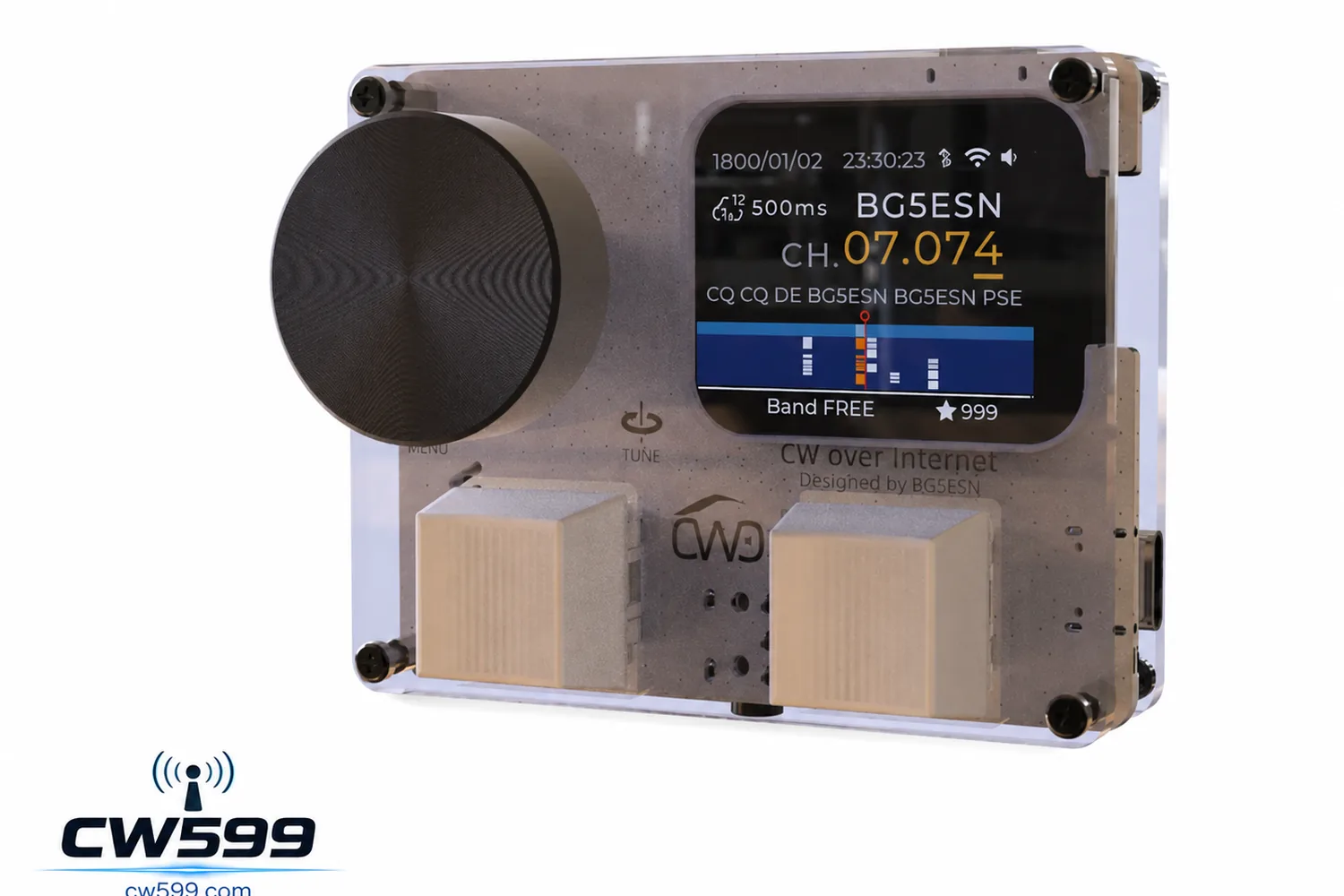
CWO uses dedicated Wi-Fi hardware that can accept a real straight key or paddle. It includes features such as CW decoding, a waterfall display and selectable virtual frequencies.
Its documentation describes the system as a broadcast-style environment designed to simulate real CW operation. Operators can tune around, listen for activity, choose a frequency and communicate much as they would on a radio band.
That makes CWO very different from a normal online chat room.
You are not typing Morse characters into a text box.
You are still sending CW.
How do you use CWO?
After registration and Wi-Fi configuration, the user connects the unit to an available CWO server.
From there, the experience starts to resemble a miniature software-defined radio:
- Tune to a virtual frequency.
- Look and listen for activity.
- Find an unused frequency.
- Connect a straight key or paddle.
- Call CQ.
- Complete a QSO using normal CW procedure.
The current CWO documentation even suggests different sections of its simulated spectrum for different skill levels.
For example, 7.000–7.010 is suggested for roughly 15–20 WPM beginner contacts, while 7.011–7.040 is intended for broader practice. A higher-speed section is also provided where users are encouraged to operate without relying on the decoder, and separate frequencies are available for automated copy practice.
It is therefore more than a Morse tutor.
A better description might be:
a CW band that happens to live on the Internet.
What is CW Hotline?
CW Hotline takes a different approach.
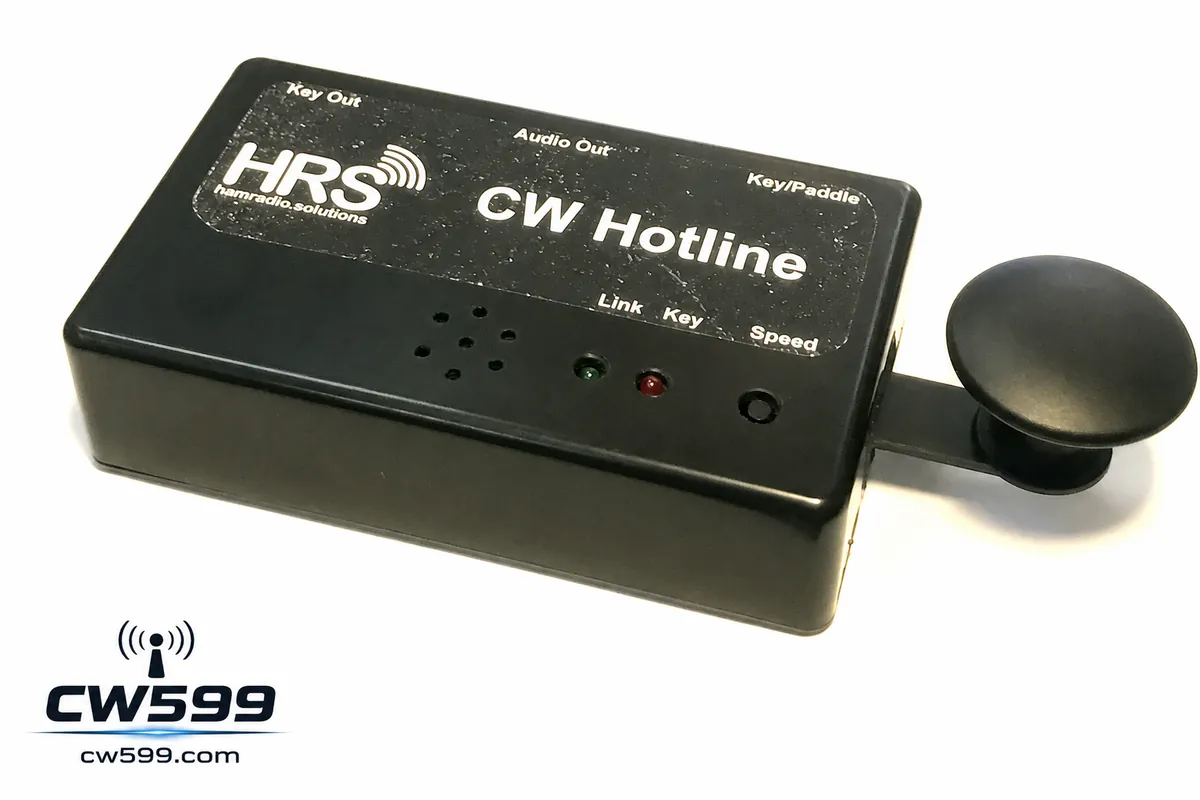
Developed by Ham Radio Solutions, it is a Wi-Fi-connected CW device that the company rather memorably describes as a kind of “Bat Phone” for CW.
Two CW Hotline units can be linked through the Internet.
When one operator keys Morse, the other unit reproduces the sender's timing and “fist” rather than simply transmitting decoded text.
The hardware can work with built-in or external paddles and straight keys, provides sidetone audio, and can also connect to the VBand Internet CW service.
So while CWO feels like entering a public virtual radio band, CW Hotline can feel much more like:
a private telephone line that only speaks Morse code.
The particularly interesting part: remote radio keying
CW Hotline can do something even more interesting.
It provides a keying output for an external transmitter.
That means one unit can sit beside a real radio station while another is located somewhere else.
Your keying actions travel over the Internet to the remote CW Hotline, which then keys the actual transceiver.
Ham Radio Solutions lists low-latency remote CW station keying as one of the system's primary uses.
We can therefore think of modern CW in three different ways.
Traditional CW
Key → radio → antenna → ionosphere → radio
Internet CW
Key → Internet → another Internet CW device
Remote-radio CW
Key → Internet → remote radio → antenna → ionosphere
The path changes.
The operator's hand can remain on the key.
Why does Internet CW matter?
There is a difficult stage in learning Morse that software trainers alone do not completely solve.
You know the alphabet.
You have practiced copying.
Maybe you can copy random callsigns at 15 or 20 WPM.
Then one evening you turn on the radio and hear:
CQ CQ CQ DE ...
And suddenly you do not want to answer.
CW operators sometimes call this key fright.
An ARRL review of CW Hotline described essentially this problem: the author had studied Morse and made some contacts, but still felt that improving required more practice with real people in a lower-pressure environment.
That is where Internet CW becomes particularly valuable.
There is a missing step in the traditional learning path:
Trainer → ? → Real on-air QSO
The question mark can be a practice environment populated by actual humans.
That is where CW Room comes in
This is also part of the reason we created CW Room at CW599.
It shares some ideas with CWO and CW Hotline, but takes another route.
Our starting point was simple:
Do not require special hardware before someone can enter the room.
A browser should be enough.
CW Room currently simulates part of the 40-meter CW band from 7.000 to 7.050 MHz. Users can tune by clicking or dragging across the activity display, or by entering a frequency directly. A waterfall-style view shows recent activity.
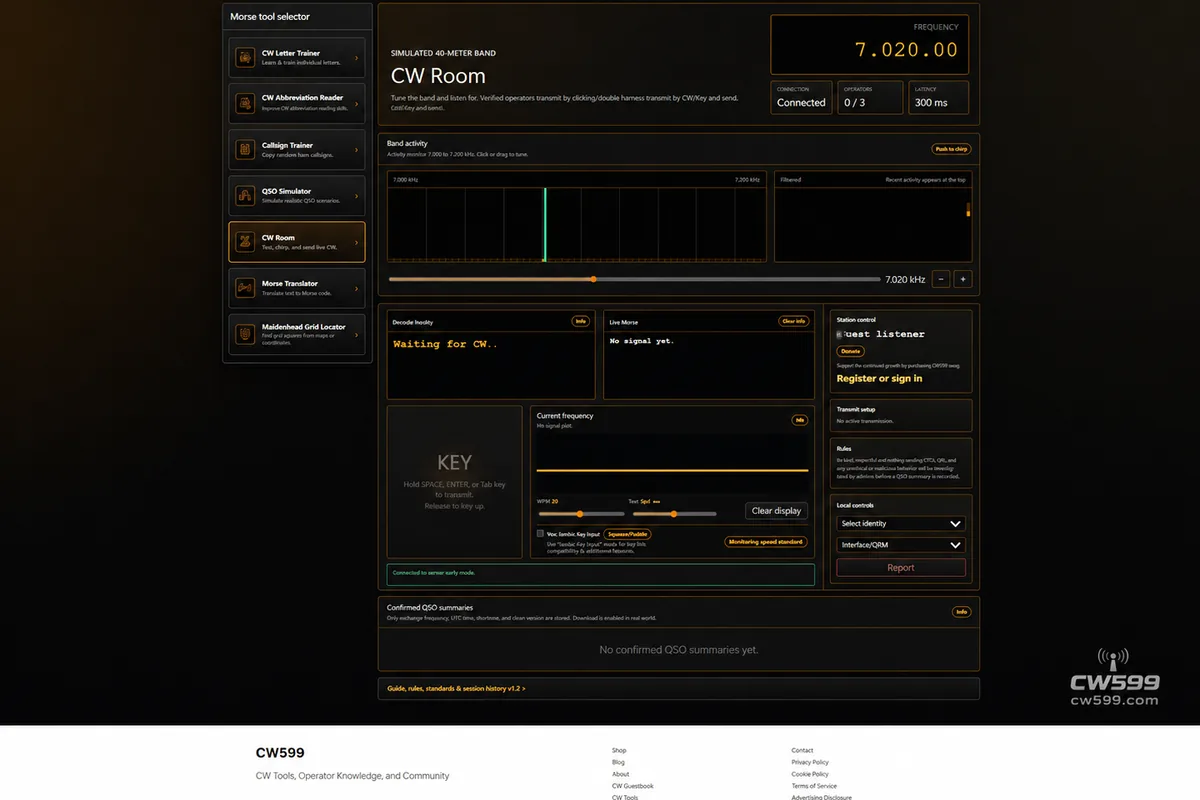
It is not a conventional text chat.
There is no message box where you type a sentence and click Send.
If you want to talk, you have to send CW.
How to use CW Room
1. Tune around first
Enter the room and look across 7.000–7.050 MHz.
If you see activity, tune to it and listen.
The basic behavior is intentionally similar to turning the VFO on a real radio.
2. Listen before transmitting
One of the operating principles of CW Room is simple:
Listen first.
Before calling CQ, make sure another QSO is not already taking place on the frequency.
It is partly a technical rule, but it is also practice for good operating behavior on real amateur bands.
3. Use your keyboard as a Morse key
You do not currently need dedicated hardware.
Holding SPACE or ENTER keys the transmitter.
Releasing the key ends the element.
An experimental mobile mode can also use a phone's volume buttons as a Morse key, although support varies between devices and browsers.
So even a phone can become a very primitive CW terminal.
4. Call CQ and make a contact
Find a quiet frequency and send something like:
CQ CQ CQ DE BA7XXX BA7XXX K
Another operator can tune to your frequency and answer:
BA7XXX DE XX1XXX K
From there, the contact can follow normal CW procedure.
Exchange:
- Callsigns
- RST
- QTH
- Name
- Rig
- Antenna
- Weather
Or simply have a CW ragchew.
CW Room currently uses a three-seat roundtable model, limiting the number of active transmitters on one frequency to help avoid chaotic overlapping transmissions.
5. Finish the QSO
A completed contact can be closed by sending:
CFSK
At least two authenticated participants must independently confirm the contact before CW Room generates a QSO summary.
The current system stores only summary information such as callsigns, frequency, UTC time, duration and rules version for normal confirmed contacts; decoded conversation content is not retained as the QSO record.
This gives CW Room a little of the feeling of a logbook.
But it is important to be clear about what it is not.
A contact conducted entirely inside CW Room is an Internet CW contact, not an RF amateur-radio QSO.
The purpose is practice and communication, not the creation of artificial DXCC contacts.
CW Room should not replace radio
This principle matters to us.
If CW Room became so convenient that users stopped turning on their radios, we would have built the wrong thing.
The ideal journey looks more like this:
CW Letter Trainer
↓
Callsign Trainer
↓
QSO Simulator
↓
CW Room
↓
Turn on a real transceiver
↓
Complete your first RF CW QSO
This may eventually become one of the most important roles of CW599.
CW Room is not the destination.
It should be the last practice room before you go on the air.
Where could CW Room go next?
The current version is only the beginning of that idea.
There are several directions we would like to explore.
Real Morse keys
Today, SPACE and ENTER can act as keys.
The obvious next step is:
USB interface + straight key or paddle → browser → CW Room
At that point, a Begali paddle, Vibroplex bug, homebrew key or an old military straight key could become an Internet communication device.
And ideally, the system should preserve exactly what makes every operator different:
timing.
spacing.
rhythm.
fist.
Because CW is not fundamentally a sequence of characters.
CW is timing.
Elmer-to-beginner practice
Imagine a learner who has just reached 10 WPM entering a beginner area.
An experienced CW operator is already there, slowly sending:
CQ NEW CW OP
The learner answers.
They make a simple QSO.
The learner makes a mistake.
Nothing terrible happens.
They send a few dits, correct the word and continue.
That psychological difference matters.
Making mistakes on an Internet practice frequency is much easier than overcoming the fear of making them during your first real 40-meter QSO.
CW classrooms
CW Room could eventually support scheduled practice sessions such as:
Beginner CW — 10 WPM
Ragchew — 18 WPM
High Speed CW — 30+ WPM
An instructor could operate with a small roundtable of students.
At that point CW Room stops being just another web utility.
It starts looking more like a permanently open Internet CW club.
A bridge from simulation to radio
The larger vision for CW599 is to connect several currently separate activities:
learning Morse
→ practicing callsigns
→ learning QSO procedure
→ talking to real people through Internet CW
→ understanding your radio
→ getting on the air
Imagine learning CQ on CW599 today.
Practicing a QSO tomorrow.
Making your first human contact in CW Room next week.
Then one evening you close the browser and turn on an FT-710, IC-7300, KX2 or QCX.
You tune around 7 MHz.
Put on your headphones.
And hear:
CQ CQ CQ DE ...
This time, it does not feel unfamiliar.
You answer.
The Internet changes the path, not CW itself
CWO, CW Hotline and CW Room demonstrate something interesting.
CW did not become obsolete when the Internet arrived.
Instead, the Internet gave CW another medium to explore.
CWO turns the Internet into a virtual radio band.
CW Hotline turns it into a Morse cable stretching across cities and countries.
CW Room is trying to lower the entrance barrier even further:
open a browser, tune to a frequency, listen for a while, and start keying.
But eventually we still hope you turn the radio on.
Because a simulated 7.020 MHz does not really have QSB.
It does not have genuine QRM.
Propagation does not suddenly open.
And at two in the morning, a 5-watt station from the other side of the world will not unexpectedly rise out of the noise in your headphones.
The Internet can reproduce many parts of CW.
It cannot reproduce all of radio.
And perhaps that is exactly why radio — and CW — remains so fascinating.
When Everything Fails, CW Still Works.