
Connect and select
Connect the key before power-on and listen for M or A.
SW-3B is a compact 40/30/20 m CW transceiver still offered by Venus. The current product is advertised with an OLED display; the linked April 2019 manual documents the controls but describes an earlier display and current consumption. Those older display figures are not applied to the current unit.
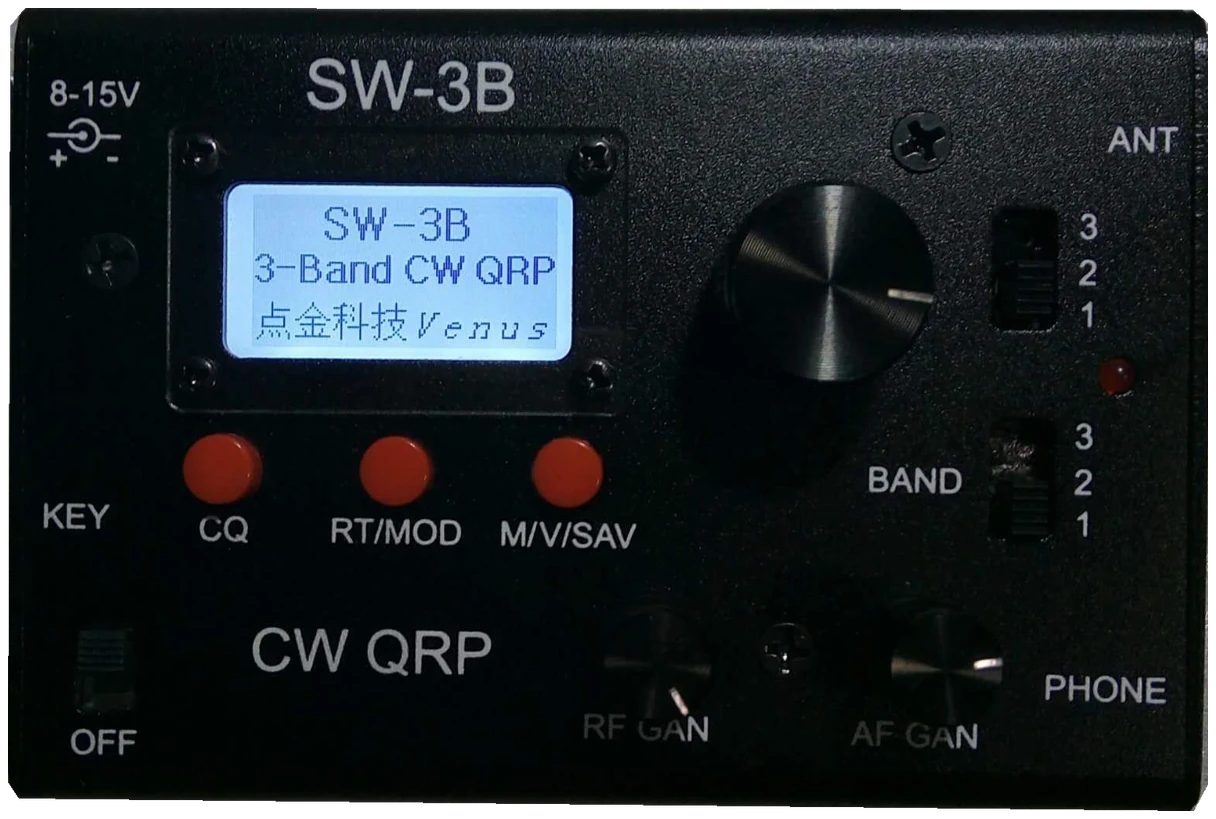
English SW-3B manual, April 2019; current OLED listing cross-checked; confirm supplied unit revisions. Checked 2026-10-07; original firmware; printed manual pages unless marked PDF.
Use this order as an operating checklist, not as a replacement for the radio manual. Controls and available options can vary by firmware and region.
Connect the key before power-on and listen for M or A.
Use a suitable dummy load for setup; the checked manual does not document a dedicated no-RF practice switch.
Release CQ at S to adjust speed, then exit with a short press.
Match both BAND switches and tune a clear CW note.
Check the saved call and stop action, connect the antenna, send once and listen.
Search by setting or menu path. Manufacturer defaults and recommendations are labeled separately from CW599 advice; references identify the checked manual or software version.
KEY jack; power-on identificationCW599 note: The radio identifies the connected plug at startup. Listen for M or A and test the expected elements. A straight-key connection and a paddle have different ring wiring; inspect the plug before blaming the keyer.
Manual reference: SW-3B User Manual, April 2019, pp. 1–4; current OLED product description
Both BAND switches; hold RT/MOD for modeCW599 note: Match the two BAND positions for the intended band. Hold RT/MOD for more than two seconds to cycle mode. CW and CWR place the received note on opposite sides; retune after switching.
Manual reference: SW-3B User Manual, April 2019, pp. 1–4; current OLED product description
Hold CQ about 2 seconds > S > paddle; tap CQ to finishCW599 note: Release CQ at S and use the paddle to change speed. Tap CQ to finish, or let the documented eight-second timeout return to normal. Check a short word before a call.
Manual reference: SW-3B User Manual, April 2019, pp. 1–4; current OLED product description
CW sidetone; AF GAINCW599 note: The checked manual specifies a 600 Hz sidetone rather than a pitch menu. Match the received note by ear and keep headphone volume comfortable; do not search for an undocumented pitch control.
Manual reference: SW-3B User Manual, April 2019, pp. 1–4; current OLED product description
CW/CWR mode; RF GAIN and AF GAINCW599 note: The filter follows the operating mode. Center the wanted note first; reduce RF gain if strong signals overload reception and use AF gain for loudness. Neither gain control widens the CW filter.
Manual reference: SW-3B User Manual, April 2019, pp. 1–4; current OLED product description
Tap RT/MOD; press tuning knob to select RIT/XITCW599 note: Read the active offset indicator before turning the knob. RIT moves listening while XIT moves your transmission. Clear an old offset before answering on the caller’s frequency.
Manual reference: SW-3B User Manual, April 2019, pp. 1–4; current OLED product description
Tap M/V/SAV; hold more than 2 seconds to storeCW599 note: Select the intended memory channel and store the tuned frequency and mode. Recall it and check both values. These channels are not eight separate text-message buffers.
Manual reference: SW-3B User Manual, April 2019, pp. 1–4; current OLED product description
Hold CQ about 4 seconds > I > key callsign; tap CQ to finishCW599 note: Record in automatic-key mode and check the complete stored call into a suitable dummy load. The automatic phrase uses the stored callsign; confirm the stop action before using an antenna.
Manual reference: SW-3B User Manual, April 2019, pp. 1–4; current OLED product description
No matching settings. Try a shorter search or clear the search and category.
These are original operator-oriented starting points. They are not factory presets and intentionally avoid claiming model-specific default values.
Check one change at a time.
Keep the wanted signal audible.
Leave a clear path back to receiving.
The checked documentation does not provide a built-in received-CW text workflow for SW-3B. Automatic key identification and CQ playback do not decode incoming text.
No. M/V/SAV stores frequency and mode; callsign recording uses the CQ button.
The manufacturer’s current OLED listing is newer than the linked 2019 manual. Use the supplied revision for display and battery planning.
Use the manufacturer-controlled product and support pages to verify your region, firmware, menus, connector wiring, operating limits, and safety information. CW599 does not host, mirror, or reproduce the manual.
Search and filters run locally in your browser and do not connect to a radio. Version 1.0 (2026-10-07): four-language guide and sourced product photo. Revisions are retained in site Git and release backups; no separate archived page.